
Session Tracing & Agent Testing
Run agent tests from Cursor and read session traces to understand what your Agentforce agent actually did.
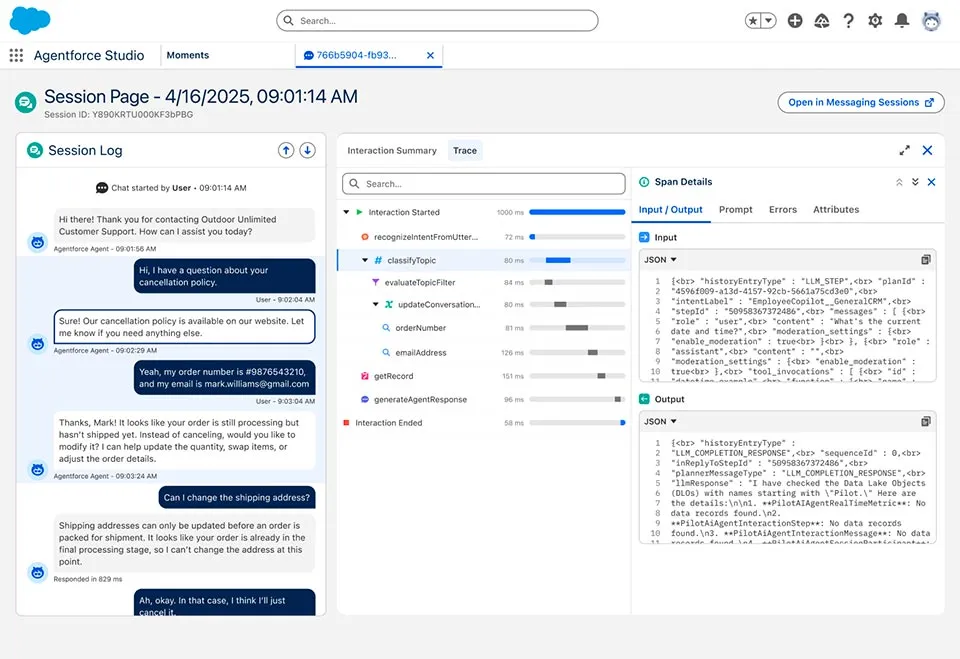
An Agentforce agent that you've never tested is a demo accident waiting to happen. The good news: Salesforce ships a proper test runner, session traces that tell you exactly which topic fired and which action ran, and skills that the agent in Cursor can use to analyze both.
Skills to load
sf-ai-agentforce-testing for writing and running tests. sf-ai-agentforce-observability for reading session traces from Data 360.
The two questions you're trying to answer
- Did my agent do the right thing for this utterance? That's what tests are for. You write expected behavior, the runner replays the utterance, you get a pass or fail.
- What actually happened inside the agent when it ran? That's what session tracing is for. Every real or simulated conversation produces a trace with the topics considered, the actions called, the arguments passed, and the outputs returned.
You want both. Tests prove the agent behaves correctly. Traces tell you why when it doesn't.
Agent tests
Agent tests live as .aiEvaluationDefinition metadata. Each test is one utterance, the expected topic, the expected actions, and any assertions about the response.
A test looks like this:
<?xml version="1.0" encoding="UTF-8"?>
<AiEvaluationDefinition xmlns="http://soap.sforce.com/2006/04/metadata">
    <description>Warranty intake routes to the warranty topic</description>
    <name>Warranty_Intake_Routing</name>
    <subjectType>AGENT</subjectType>
    <subjectName>Customer_Service_Agent</subjectName>
    <testCase>
        <utterance>My blender stopped working. It's under warranty.</utterance>
        <expectation>
            <name>expectedTopic</name>
            <expectedValue>Warranty_Claim_Intake</expectedValue>
        </expectation>
        <expectation>
            <name>expectedAction</name>
            <expectedValue>Look_Up_Serial_Number</expectedValue>
        </expectation>
    </testCase>
</AiEvaluationDefinition>
Writing tests the fast way
Ask the agent:
@force-app/main/default/agents/Customer_Service_Agent

Load the sf-ai-agentforce-testing skill. Based on this agent's topics,
generate 8 `.aiEvaluationDefinition` tests. Cover:

- The happy path for each top-level topic.
- Two edge cases where the utterance is ambiguous between topics.
- One refusal case where the agent should decline (outside its scope).
- One small-talk case.

Place them in force-app/main/default/aiEvaluationDefinitions/.
With the testing skill loaded, the output lands close to production-ready on the first pass.
Running tests
Deploy the test definitions to the org
sf project deploy start --source-dir force-app/main/default/aiEvaluationDefinitions --target-org demoRun the suite
sf agent test run \
  --api-name Warranty_Intake_Routing \
  --target-org demo \
  --result-format human \
  --wait 10
For everything:
sf agent test list --target-org demo
# pick the ones you want, or loop through all of them
Read the output
Passing tests print a green check. Failing tests print the expectation, the actual result, and the session ID for the trace. That session ID is the key to the next section.
Running tests from chat
The agent in Cursor can drive the full loop:
Run all aiEvaluationDefinition tests for the Customer_Service_Agent
against my default org. For any failure, pull the session trace and
tell me what went wrong. Propose a fix to either the agent definition
or the test, and explain which one is correct.
The testing skill knows how to distinguish a test bug from an agent bug, which saves you a round of second-guessing.
Session tracing
Every invocation of an Agentforce agent produces a session trace. The trace captures:
- The utterance.
- The topic the planner selected.
- Each action it called, with arguments and return values.
- The final response.
- Latency and token usage at each step.
Traces land in Data 360 under the Session Telemetry Data Model (STDM). You can query them with SQL or pull the raw parquet files for offline analysis.
Pulling a trace for a failing test
When a test fails, the output includes a session ID. To pull just that session:
sf data query \
  --target-org demo \
  --query "SELECT Id, Start_Time__c, End_Time__c, Utterance__c, Final_Response__c FROM AgentSession__dlm WHERE Id = '<session-id>'" \
  --data-space default
For the step-by-step breakdown:
sf data query \
  --target-org demo \
  --query "SELECT Id, Step_Type__c, Name__c, Input__c, Output__c, Latency_Ms__c FROM AgentStep__dlm WHERE Session_Id__c = '<session-id>' ORDER BY Step_Order__c" \
  --data-space default
Reading a trace with the agent
Once you've pulled the trace rows, drop them into chat:
@logs/session-abc.json

Load the sf-ai-agentforce-observability skill. Walk this trace step by
step. For each step, tell me:

- What the planner was trying to do.
- Whether the action that ran was the right one.
- What the alternative topic or action would have been.
- Where the agent lost the thread.
The observability skill knows the STDM shape and will cite specific steps rather than summarizing loosely.
Bulk analysis from Data 360
For a real audit (for example, "which of our top 20 customer utterances routed correctly last week?"), pull the parquet files from Data 360 directly and let the skill process them in bulk:
sf data360 query export \
  --query "SELECT * FROM AgentSession__dlm WHERE Start_Time__c >= LAST_WEEK" \
  --target-org demo \
  --output-dir traces
Then:
@traces/

Load sf-ai-agentforce-observability. Group these traces by topic.
For each topic, report pass rate, median latency, and the three most
common failure patterns with one example session ID each.
That kind of report used to take an afternoon. The skill does it in minutes.
A realistic test-and-trace loop
Day-one-of-demo workflow that holds up in practice:
- Write the happy path tests for every top-level topic. Eight to twelve tests is usually enough for a first pass.
- Deploy them. They'll fail the first time. That's fine.
- Run them. For each failure, pull the trace. Fix either the agent or the test.
- Add edge cases. Ambiguous utterances, refusals, small talk. These are where real agents fall over in front of customers.
- Run the suite daily while the agent is being built. Especially after every topic or action change.
- Trace any weird real conversation during demo rehearsals. Customers say things in ways you never imagined. Each one either becomes a new test or a new topic.
Things that trip up first-time testers
- Topic names with spaces. Use underscores in the
aiEvaluationDefinitionso the name matches the API name, not the label. - Testing against an org without STDM enabled. Session traces require Data 360 with Session Telemetry turned on. Without it, tests run but traces are empty.
- Confusing "the test failed" with "the agent is wrong". Sometimes the test expected the wrong topic. Always pull the trace before rewriting the agent.
- Short utterances. "Yes" or "hello" with no context routes unpredictably. If you want to test those, set up a preceding conversation in the test case.
What to do next
- Pick the right agent primitive in Agent vs. Builder vs. Script.
- Build the agent itself in Agentforce DX.
- Deepen your analysis with
sf-ai-agentforce-observability.