
Hooks and Custom Commands
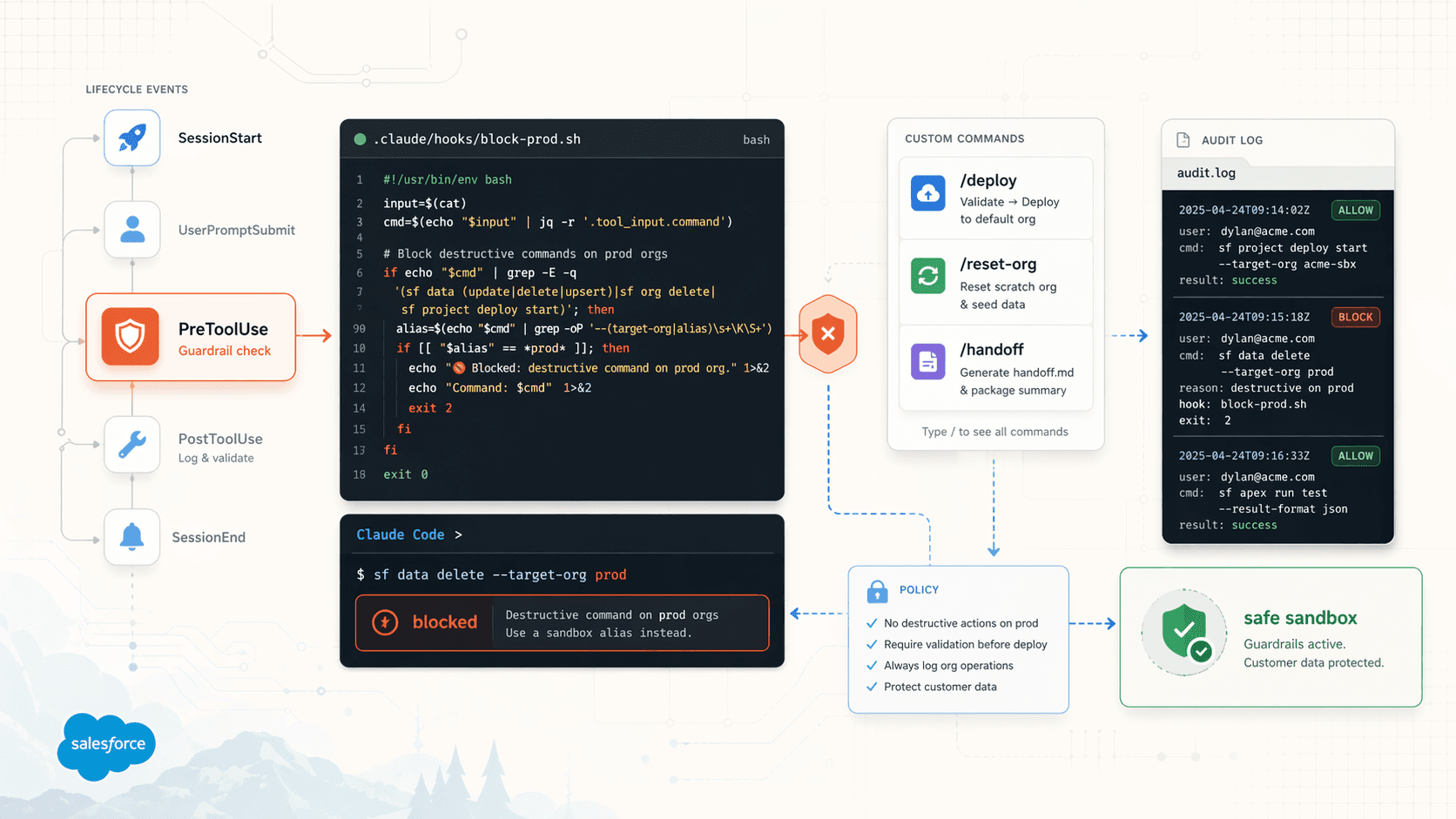
The deterministic layer of Claude Code for Salesforce work. Guardrails that keep customer data safe, validators that keep broken code out of the repo, and shortcuts for work you do every day.
Skills and subagents guide the model. Hooks and custom commands are different. They don't ask the model anything. They run.
- Hooks. Shell scripts that fire at specific Claude Code lifecycle events. Your guardrails, your validators, your notifications.
- Custom slash commands. Your own
/namecommands. Use them for repeatable work you'd rather not retype.
Why SF teams care
Salesforce work has a specific blast radius. A misaimed sf data delete hits a customer's sandbox. A deploy against the wrong alias lands on a production org during a demo. An uncommitted permset change breaks the next SE's reset script.
Hooks turn SE tribal knowledge into code the whole team shares.
- Customer data safety. Block any destructive
sfcommand against a production-aliased org. Full stop. Not a rule inCLAUDE.mdthat Claude "should" follow; an exit code that the tool cannot override. - Demo hygiene. Every Apex edit runs through validation before it lands. Every scratch reset runs a known script. Every customer hand-off triggers a checklist.
- Team consistency. The same guardrails for every SE, committed to the repo. The new SE who joined yesterday has the same safety rails as the principal who wrote them.
- Audit trail.
PostToolUsehooks can log everysfcommand with timestamp and target org. Your implementation partners will love you.
The rest of this page is the patterns worth copying.
Hooks
The 14 events
| Event | Fires when |
|---|---|
SessionStart | Claude Code starts a session |
UserPromptSubmit | The user submits a prompt |
PreToolUse | Before a tool executes |
PermissionRequest | Claude asks for permission to do something |
PostToolUse | After a tool succeeds |
PostToolUseFailure | After a tool fails |
Notification | Claude sends a notification (idle, waiting) |
SubagentStart | A subagent starts |
SubagentStop | A subagent finishes |
Stop | The main session ends a turn |
TeammateIdle | A teammate goes idle (agent teams only) |
TaskCreated | A shared task is created (agent teams only) |
TaskCompleted | A shared task is marked complete (agent teams only) |
PreCompact | Before context compaction runs |
SessionEnd | The session exits |
Where hooks live
Three files, three scopes.
~/.claude/settings.json           # personal, every project
.claude/settings.json             # project, shared via git
.claude/settings.local.json       # personal project override, gitignored
Later scopes override earlier ones. For SF teams, project-level (.claude/settings.json) is the right home. It's in git, it's reviewed in PRs, and every team member runs with the same guardrails.
Exit codes control the turn
- Exit 0. Continue normally.
- Exit 2. Block the action. The hook's stderr goes back to Claude as feedback. This is the magic code for guardrails.
- Any other non-zero exit. Tool errors out.
Hook types
- Command. A shell script. What you'll write 95% of the time.
- Prompt. A one-shot LLM call decides whether to block or allow.
- Agent. A multi-turn subagent investigates and decides. Rare, but useful for gates that need real reasoning.
SF hook patterns
Every pattern here has two ways to ship it. Use the Claude Code Prompt tab if you want Claude to build it for you. Use Manual Setup if you want to wire it yourself.
1. Block destructive commands on production
Stops sf data delete, sf org delete, and sf project deploy start from ever firing against an org whose alias contains prod. The single highest-value hook on the list.
Paste this into Claude Code.
Create a PreToolUse hook that blocks destructive sf CLI commands against
any org alias containing "prod".

1. Create .claude/hooks/block-prod.sh that:
   - Reads the tool invocation from stdin as JSON
   - Extracts .tool_input.command with jq
   - If the command matches: sf data (update|delete|upsert), sf org delete,
     or sf project deploy start
     AND the --target-org or --alias flag contains "prod"
   - Print a clear block message to stderr and exit 2
   - Otherwise exit 0

2. chmod +x .claude/hooks/block-prod.sh

3. Wire it in .claude/settings.json under hooks.PreToolUse with
   matcher "Bash".

Do not modify any other files. Show me the final contents of both files..claude/hooks/block-prod.sh:
#!/usr/bin/env bash
INPUT="$(cat)"
COMMAND="$(echo "$INPUT" | jq -r '.tool_input.command // ""')"

if echo "$COMMAND" | grep -qE "sf (data (update|delete|upsert)|org delete|project deploy start)"; then
  if echo "$COMMAND" | grep -qE "(--target-org|--alias) \S*prod"; then
    echo "Blocked: destructive operation against a production-aliased org. If this is intended, run it manually." >&2
    exit 2
  fi
fi
exit 0
Make it executable, then wire it in .claude/settings.json:
{
  "hooks": {
    "PreToolUse": [
      {
        "matcher": "Bash",
        "command": ".claude/hooks/block-prod.sh"
      }
    ]
  }
}
2. Validate every Apex edit
Every .cls or .trigger edit runs through sf project deploy validate against the default org. Broken Apex never makes it to git add.
Create a PostToolUse hook that validates Apex edits before they land.

1. Create .claude/hooks/validate-apex.sh that:
   - Reads the tool result from stdin as JSON
   - Extracts .tool_input.file_path with jq
   - If the file ends in .cls or .trigger:
     - Run sf project deploy validate --source-dir <that file's folder> --json
     - If the result's status is 1, print the component failure problems to stderr and exit 2
     - Otherwise exit 0
   - If the file is not Apex, exit 0 immediately

2. chmod +x .claude/hooks/validate-apex.sh

3. Wire it in .claude/settings.json under hooks.PostToolUse with
   matcher "Edit|Write".

Show me both files when done..claude/hooks/validate-apex.sh:
#!/usr/bin/env bash
INPUT="$(cat)"
FILE="$(echo "$INPUT" | jq -r '.tool_input.file_path // ""')"

if [[ "$FILE" == *.cls || "$FILE" == *.trigger ]]; then
  OUT="$(sf project deploy validate --source-dir "$(dirname "$FILE")" --json 2>&1 || true)"
  if echo "$OUT" | jq -e '.status == 1' > /dev/null; then
    echo "Validation failed for $FILE:" >&2
    echo "$OUT" | jq -r '.result.details.componentFailures[]?.problem' >&2
    exit 2
  fi
fi
exit 0.claude/settings.json:
{
  "hooks": {
    "PostToolUse": [
      {
        "matcher": "Edit|Write",
        "command": ".claude/hooks/validate-apex.sh"
      }
    ]
  }
}
3. Session-start context
Claude Code starts each session knowing nothing about your current org or branch. Tell it. Every session begins with the default org alias, the current branch, and the uncommitted-file count.
Create a SessionStart hook that prints current SF and git context into
the session.

1. Create .claude/hooks/session-start.sh that prints three lines:
   - Current default org alias (from sf config get target-org --json)
   - Current git branch (git branch --show-current)
   - Count of uncommitted files (git status --porcelain | wc -l)

2. chmod +x .claude/hooks/session-start.sh

3. Wire it in .claude/settings.json under hooks.SessionStart.

Show me the final files..claude/hooks/session-start.sh:
#!/usr/bin/env bash
echo "Current default org: $(sf config get target-org --json | jq -r '.result[0].value // "none"')"
echo "Current branch: $(git branch --show-current)"
echo "Uncommitted files: $(git status --porcelain | wc -l | tr -d ' ')".claude/settings.json:
{
  "hooks": {
    "SessionStart": [
      {
        "command": ".claude/hooks/session-start.sh"
      }
    ]
  }
}
4. Audit every sf command
For customer work where you need a trail of what you did and when. Logs every sf command Claude Code runs with timestamp and target org to .claude/sf-audit.log. Pair with .gitignore.
Create a PostToolUse audit hook for sf CLI commands.

1. Create .claude/hooks/audit-sf.sh that:
   - Reads tool input from stdin as JSON
   - Extracts .tool_input.command with jq
   - If the command starts with "sf ":
     - Append a line to .claude/sf-audit.log with:
       ISO timestamp | cwd basename | the full command
   - Always exit 0 (never block)

2. chmod +x .claude/hooks/audit-sf.sh

3. Wire it in .claude/settings.json under hooks.PostToolUse with matcher "Bash".

4. Add .claude/sf-audit.log to .gitignore.

Show me the final files..claude/hooks/audit-sf.sh:
#!/usr/bin/env bash
INPUT="$(cat)"
COMMAND="$(echo "$INPUT" | jq -r '.tool_input.command // ""')"

if [[ "$COMMAND" == sf\ * ]]; then
  TS="$(date -u +"%Y-%m-%dT%H:%M:%SZ")"
  PROJECT="$(basename "$(pwd)")"
  echo "$TS | $PROJECT | $COMMAND" >> .claude/sf-audit.log
fi
exit 0.claude/settings.json:
{
  "hooks": {
    "PostToolUse": [
      {
        "matcher": "Bash",
        "command": ".claude/hooks/audit-sf.sh"
      }
    ]
  }
}
Add to .gitignore:
.claude/sf-audit.log5. Task completion gate for agent teams
When an agent team teammate tries to mark a test-related task complete, refuse unless Apex tests are actually passing. Prevents the "looks done, isn't done" failure mode.
Create a TaskCompleted hook that blocks completion of test-related tasks
if Apex tests are failing.

1. Create .claude/hooks/task-gate.sh that:
   - Reads the task info from stdin as JSON
   - Extracts .task.title with jq
   - If the title contains "test" or "coverage" (case-insensitive):
     - Run sf apex run test --wait 10 --json, save output to /tmp/apex-tests.json
     - If the command exits non-zero, print a block message to stderr and exit 2
   - Otherwise exit 0

2. chmod +x .claude/hooks/task-gate.sh

3. Wire it in .claude/settings.json under hooks.TaskCompleted.

Show me the final files..claude/hooks/task-gate.sh:
#!/usr/bin/env bash
INPUT="$(cat)"
TASK="$(echo "$INPUT" | jq -r '.task.title // ""')"

if echo "$TASK" | grep -qiE "(test|coverage)"; then
  if ! sf apex run test --wait 10 --json > /tmp/apex-tests.json 2>&1; then
    echo "Cannot complete task: apex tests failing. See /tmp/apex-tests.json" >&2
    exit 2
  fi
fi
exit 0.claude/settings.json:
{
  "hooks": {
    "TaskCompleted": [
      {
        "command": ".claude/hooks/task-gate.sh"
      }
    ]
  }
}
Hook hygiene
- Fast.
PreToolUseruns on every tool call. A two-second hook is a tax on every turn of every session. - stdin is JSON. Parse it with
jq. The shape is documented in the Claude Code hooks reference. - Write useful stderr on exit 2. That text goes back to Claude. Write it for a reader.
- Don't swallow real errors. If your hook calls
sfand it fails, don't|| exit 0the failure away. - In git. Keep hooks in
.claude/hooks/. Shared with the team, reviewed in PRs.
Custom slash commands
Hooks fire automatically. Commands are shortcuts you invoke.
Where commands live
~/.claude/commands/               # personal, every project
.claude/commands/                 # project, shared via git
{plugin}/commands/                # bundled in a plugin
Each command is a markdown file. The filename becomes the command name. The body tells Claude what to do.
SF command patterns
Same tabbed pattern: either paste the prompt and let Claude build the command file, or drop in the manual setup.
1. /deploy
Validation-first deploy to the default scratch org. Guards against accidental prod deploys.
Create a custom slash command at .claude/commands/deploy.md that:

- Has description: "Deploy force-app to the default scratch org with validation first"
- Body:
  1. Confirms the default org is a scratch org, not prod. If prod, stop and ask.
  2. Runs sf project deploy validate --source-dir force-app
  3. If validation passes, runs sf project deploy start --source-dir force-app
  4. Shows me the deploy ID and a one-line summary
  5. Does not attempt to fix deployment errors, only shows them

Use YAML frontmatter for the description. Show me the file when done..claude/commands/deploy.md:
---
description: Deploy force-app to the default scratch org with validation first
---

Run these steps.

1. Confirm the default org is a scratch org, not prod. If it is prod, stop and ask.
2. Run `sf project deploy validate --source-dir force-app`.
3. If validation passes, run `sf project deploy start --source-dir force-app`.
4. Show me the deploy ID and a one-line summary.

Do not attempt to fix any deployment errors. Show them to me and stop.
2. /reset-org
Runs your team's demo-reset script against the default org. Not the same as writing reset logic inline; the script is the source of truth and /reset-org just calls it.
Create .claude/commands/reset-org.md with:

- Description: "Reset the current default scratch org from scratch-def and demo data"
- Body: Run scripts/demo-reset.sh with the default org alias. If the script
  fails, show the failing step and stop. Do not run individual sf commands
  as a fallback.

YAML frontmatter. Show the file when done..claude/commands/reset-org.md:
---
description: Reset the current default scratch org from scratch-def and demo data
---

Run scripts/demo-reset.sh with the default org alias.
If the script fails, show the failing step and stop.
Do not run individual sf commands as a fallback.
3. /soql
SOQL shortcut with selectivity and row-count guardrails.
Create .claude/commands/soql.md:

- Description: "Run a SOQL query against the default org"
- argument-hint: "<soql-query>"
- Body:
  - Run sf data query --query "$ARGUMENTS"
  - If the query returns more than 50 rows, show the first 50 and say how
    many were truncated
  - If the filter uses a non-indexed field, warn me before executing and
    wait for confirmation

YAML frontmatter. Show the file when done..claude/commands/soql.md:
---
description: Run a SOQL query against the default org
argument-hint: <soql-query>
---

Run `sf data query --query "$ARGUMENTS"`.

If the query returns more than 50 rows, show the first 50 and tell me
how many were truncated.

If the filter uses a non-indexed field, warn me before executing and
wait for confirmation.
Usage: /soql SELECT Id, Name FROM Account WHERE CreatedDate = LAST_N_DAYS:7.
4. /review
Delegates a git-diff review to your subagents.
Create .claude/commands/review.md:

- Description: "Review the current git diff for Apex governor limits, security, and tests"
- Body:
  1. Show me git diff --stat of uncommitted changes
  2. For each .cls or .trigger in the diff, delegate to the apex-reviewer subagent
  3. For each permset in the diff, delegate to the permset-auditor subagent
  4. Consolidate findings into a single markdown report
  5. Do not make edits. Review only.

YAML frontmatter. Show the file when done..claude/commands/review.md:
---
description: Review the current git diff for Apex governor limits, security, and tests
---

Run these steps.

1. Show me `git diff --stat` of uncommitted changes.
2. For each .cls and .trigger in the diff, hand off to the apex-reviewer subagent.
3. For each permset in the diff, hand off to the permset-auditor subagent.
4. Consolidate findings into a single markdown report.

Do not make edits. Review only.
Pairs with the subagents from Subagents.
5. /handoff
Keeps docs/handoff.md current with the repo. Useful in the hour before a customer transition.
Create .claude/commands/handoff.md:

- Description: "Generate or update docs/handoff.md for the current POC"
- Body:
  - Read docs/handoff.md if it exists
  - Compare its contents against:
    - force-app/main/default/ (what is actually in the project)
    - docs/architecture.md and docs/demo-script.md (design intent)
    - The last 20 commit messages (recent changes)
  - Propose edits to handoff.md so it reflects the current project state
  - Write the updated file
  - Show me the diff

YAML frontmatter. Show the file when done..claude/commands/handoff.md:
---
description: Generate or update docs/handoff.md for the current POC
---

Read docs/handoff.md if it exists. Compare its contents against:
- force-app/main/default/ (what's actually in the project)
- docs/architecture.md and docs/demo-script.md (design intent)
- The last 20 commit messages (what's changed recently)

Propose edits to handoff.md so it reflects the current state of the POC.
Write the updated file. Show me the diff.
Argument handling
Commands take arguments via $ARGUMENTS (everything after the command) or $1, $2, etc (positional).
---
description: Create a scratch org with a specific alias and deploy to it
argument-hint: <alias>
---

Run:
sf org create scratch -f config/project-scratch-def.json -a $1 -d 7 --set-default
sf project deploy start -o $1
Usage: /new-org customer-demo.
Command versus skill
When should something be a skill versus a command?
- Command. Short, scripted, runs the same way every time. You want a keystroke shortcut.
/deploy,/soql,/reset-org. - Skill. Procedural knowledge Claude reaches for on its own. "Review Apex with this rubric" is a skill; Claude should apply it any time a review is needed, without being told.
Command if you want to invoke it. Skill if you want Claude to invoke it.
Shipping hooks and commands to your team
A plugin is the cleanest way. Put hooks in hooks/, commands in commands/, reference them in the plugin's settings, and everyone on the team runs with the same guardrails.
Next
- Skills for procedural knowledge Claude invokes on its own.
- Subagents for the worker pattern commands and skills can delegate to.
- Plugins and Marketplaces to bundle this all up for your team.
Plugins and Marketplaces
How to install the Salesforce-focused Claude Code plugins that exist today. Authoring your own is mostly optional for SEs.
Multi-Terminal Orchestration
Run six Claude Code sessions in parallel across Warp panes or tmux windows, each driving a different slice of a customer POC. One keyboard, six concurrent agents.