
Plugins and Marketplaces
How to install the Salesforce-focused Claude Code plugins that exist today. Authoring your own is mostly optional for SEs.
A Claude Code plugin is a folder with a manifest (.claude-plugin/plugin.json) that can bundle skills, subagents, hooks, custom slash commands, MCP servers, and LSP configs into one installable unit. A marketplace is a catalog of plugins that Claude Code can browse.
For SEs, most of the value is on the consuming side: install the Salesforce plugins that already exist, not build your own. This page is short on purpose.
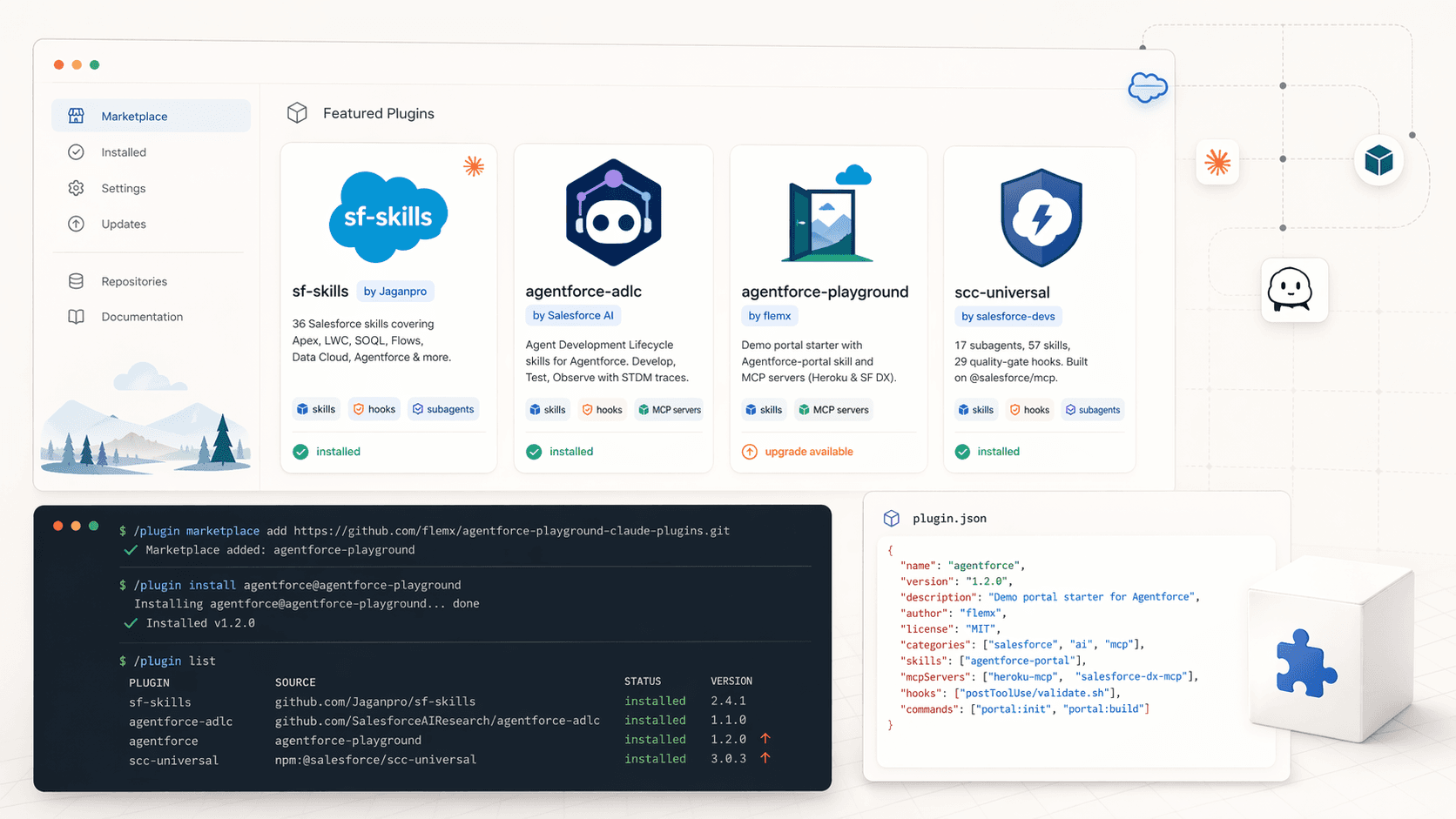
Installing from a marketplace
Three commands cover 90% of what you'll do.
/plugin marketplace add <github-url>   # register a marketplace
/plugin install <plugin>@<marketplace> # install a plugin from it
/plugin marketplace update             # refresh catalogs + versions
To manage what's installed:
/plugin list                      # installed plugins
/plugin marketplace list          # marketplaces you've added
/plugin upgrade <plugin-name>     # pull a new version
/plugin uninstall <plugin-name>
Salesforce plugins worth installing
There are four Salesforce-focused distributions you should know about. All are free and open source.
1. Jag's sf-skills — the baseline
36 Salesforce skills, 7 specialist subagents, PostToolUse validation hooks, and LSP auto-fix loops for Apex, LWC, and Agent Script. This is the de facto Salesforce skill pack. Installed via the project's own installer rather than the /plugin system:
curl -sSL https://raw.githubusercontent.com/Jaganpro/sf-skills/main/tools/install.sh | bashFull coverage of Apex, Flow, LWC, SOQL, metadata, Data 360, Agentforce, and Industries OmniStudio. Details and slash-command reference are in Using Jag's SF Skills and Agent Skills.
Repo: github.com/Jaganpro/sf-skills
2. agentforce-adlc from Salesforce AI Research
Official Salesforce-authored plugin for the Agent Development Lifecycle. Three consolidated skills — /developing-agentforce, /testing-agentforce, /observing-agentforce — covering authoring, discovery, scaffolding, deployment, testing, and STDM trace analysis for Agent Script .agent files. Includes an LLM-driven safety review (7 categories) that runs on every Write of a .agent file.
git clone https://github.com/SalesforceAIResearch/agentforce-adlc.git
/plugin marketplace add ./agentforce-adlc
/plugin install adlc@agentforce-adlc
When installed as a plugin, commands are namespaced: /adlc:developing-agentforce, /adlc:testing-agentforce, /adlc:observing-agentforce. Complements sf-skills (the ADLC team explicitly credits Jag's project as inspiration).
Repo: github.com/SalesforceAIResearch/agentforce-adlc
3. agentforce-playground — demo portal marketplace
An experimental marketplace from Salesforce SE Damien Fleminks. The flagship agentforce plugin ships the agentforce-portal skill (clones and configures a Next.js portal for showcasing Agentforce agents) plus the Heroku MCP and Salesforce DX MCP servers pre-wired.
/plugin marketplace add https://github.com/flemx/agentforce-playground-claude-plugins.git
/plugin install agentforce@agentforce-playground
Best for: quickly standing up a branded demo portal for a customer workshop or POC.
Repo: github.com/flemx/agentforce-playground-claude-plugins
4. scc-universal (Salesforce Claude Code)
A heavier alternative pack: 17 subagents, 57 skills, 29 quality-gate hooks, backed by @salesforce/mcp. Organised into core, apex, lwc, and full install profiles. Installed via npm rather than the /plugin command:
npx scc-universal install               # full profile for Claude Code
npx scc-universal install apex          # Apex-focused subset
npx scc-universal doctor                # diagnose missing files
Overlaps with Jag's library. Pick one or the other for your daily drivers rather than running both — the hook-heavy approach of SCC will double up with Jag's hooks if you install both.
Repo: github.com/jiten-singh-shahi/salesforce-claude-code
Recommended starting stack
Install sf-skills for baseline Salesforce coverage, then add agentforce-adlc if you build agents with Agent Script. Add agentforce-playground when you need a demo portal. Treat scc-universal as an alternative to sf-skills, not a supplement.
Shipping your own plugin (when it's worth it)
Skip this section unless you're packaging team-wide tooling. Individual skills and subagents are fine sitting in ~/.claude/.
A plugin is worth building when:
- Your SE team needs the same toolkit across every laptop.
- You maintain per-customer POC toolkits with customer-specific MCP servers, skills, and slash commands.
The minimal shape:
my-plugin/
├── .claude-plugin/
│   └── plugin.json       # { "name": "...", "version": "1.0.0", "description": "..." }
├── skills/               # optional
├── agents/               # optional
├── commands/             # optional
└── hooks/                # optional; wire in plugin settings
Push the plugin repo to GitHub, then distribute either:
- Directly:
/plugin marketplace add https://github.com/your-org/your-plugin(the repo itself acts as a single-plugin marketplace if you add amarketplace.json). - Via a team marketplace: one repo with a
marketplace.jsonthat references multiple plugin repos.
Bump the version in plugin.json for each release. Users pull updates with /plugin marketplace update then /plugin upgrade <name>. Stay on semver.
Symlinks, not relative paths
When a plugin is installed, Claude Code copies its directory to a cache location. A plugin cannot reference files outside its own folder with ../shared-utils paths. If multiple plugins need to share files, use symlinks inside each plugin's folder.
When not to ship a plugin
- You're the only one who uses the tooling. Keep it in
~/.claude/. - The content changes daily. Plugins work best when stable. A daily-changing skill belongs in the project's
.claude/skills/folder. - You'd be duplicating what Jag or Salesforce AI Research already ships. Open a PR against their repo instead.
Next
- Agent Skills for the payload most of these plugins carry.
- Subagents for the worker pattern bundled in
sf-skillsandscc-universal. - Hooks and Custom Commands for the deterministic layer these plugins install into your settings.
Agent Skills
Self-contained capability packs that load on demand. Metadata lives in memory. Full instructions load only when Claude reaches for them.
Hooks and Custom Commands
The deterministic layer of Claude Code for Salesforce work. Guardrails that keep customer data safe, validators that keep broken code out of the repo, and shortcuts for work you do every day.