
Agent Skills
Self-contained capability packs that load on demand. Metadata lives in memory. Full instructions load only when Claude reaches for them.
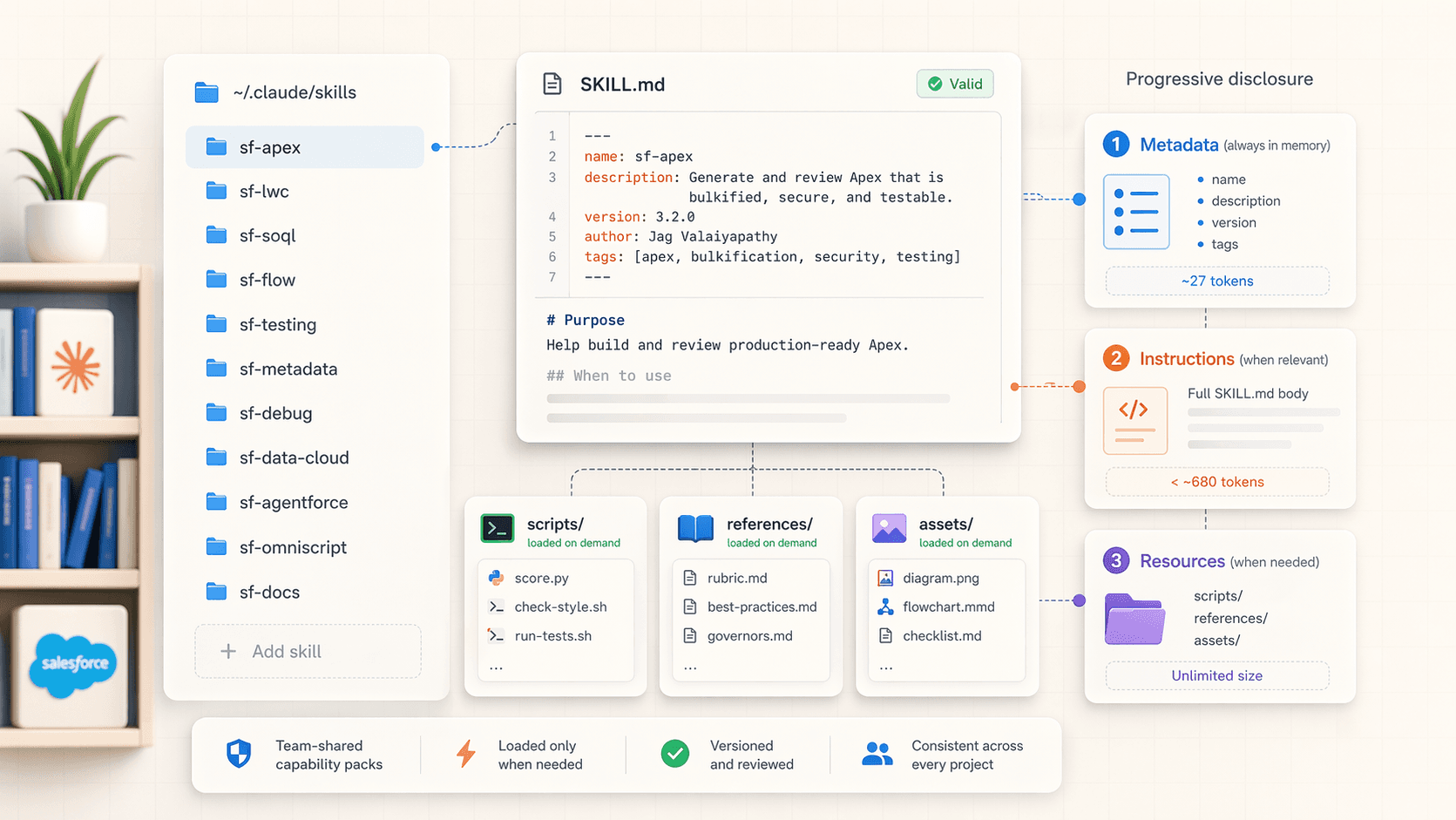
A skill is a folder. Inside that folder is a SKILL.md with YAML frontmatter on top and plain markdown below. Optionally, it can ship scripts, references, and assets.
Skills solve a specific problem: how to give Claude deep procedural knowledge without burning context on every turn. They load in three levels.
Don't write your own. Install Jag's.
Before you write a single skill by hand, install Jag Valaiyapathy's sf-skills library. 36 production-grade Salesforce skills, 7 specialist subagents, and a hook system that runs on every Write and Edit. It is the de facto starting point for Salesforce work in Claude Code. We cover installation and every slash command in Using Jag's SF Skills; this page focuses on how to invoke them and why.
Progressive disclosure
| Level | What loads | When |
|---|---|---|
| 1. Metadata | name, description from frontmatter. ~27 tokens. | At session start, for every skill Claude can see. |
| 2. Instructions | The full SKILL.md body. Keep under ~680 tokens for discipline. | When Claude decides the skill is relevant. It will ask, or just load it. |
| 3. Resources | Anything in scripts/, references/, assets/. Unlimited size. | Only when the body of SKILL.md tells Claude to read it. |
The trick: at session start, Claude knows every skill exists and what each one does, but has loaded almost nothing. When a user prompt matches a skill's description, Claude reaches for it. You pay the full token cost only when the skill is needed.
Where skills live
~/.claude/skills/              # your personal skills, every project
.claude/skills/                # shared with the team, committed to git
{plugin}/skills/               # skills bundled inside a plugin
Inside skills/ each skill is a folder containing at least SKILL.md.
~/.claude/skills/
└── sf-apex/
    ├── SKILL.md
    ├── references/
    │   └── rubric.md
    └── scripts/
        └── score.py
That is the exact shape Jag's sf-apex ships with: a SKILL.md body, a rubric in references/, and scoring scripts the skill invokes.
Install the library first
Two commands, two paths. Pick the one that matches your tool.
npx skills add Jaganpro/sf-skillsThat gets you the 36 skill files for Cursor, Codex, Gemini CLI, or Claude Code without local hooks.
For the full Claude Code experience (skills + 7 specialist subagents + PostToolUse validation hooks + LSP auto-fix loops on Apex / LWC / Agent Script + Code Analyzer):
curl -sSL https://raw.githubusercontent.com/Jaganpro/sf-skills/main/tools/install.sh | bashRestart Claude Code afterwards. See Using Jag's SF Skills for prerequisites, update commands, and the full skill-by-skill reference.
Slash commands — when and why to invoke each
Every skill in Jag's library is exposed as a slash command. Claude will pick one automatically when your prompt matches the skill's description, but typing /sf-apex (or whichever) forces it to load, which is what you want when you're about to do real work.
Type /sf- in Claude Code to see the full list. Below is the working mental model: which command to reach for, and why.
Development and query skills
These are the skills that run every day. Each one ships with a scoring rubric so output is reproducible across the team.
| Slash command | Invoke when | Why it beats a raw prompt |
|---|---|---|
/sf-apex | You're writing or reviewing *.cls or *.trigger files | Enforces Trigger Actions Framework, bulkification, and scores output on a 90-point rubric (Testing 25, Architecture 20, Clean Code 20, Error Handling 15, Performance 10). Auto-formats with Prettier and runs PMD. |
/sf-flow | You're building or reviewing *.flow-meta.xml | Requires fault paths on every DML/callout, naming conventions, bulk-safe logic. 110-point rubric across 6 categories plus Flow Scanner. |
/sf-lwc | You're building Lightning Web Components | SLDS 2 class usage, accessibility (ARIA, keyboard, focus), dark mode, wire patterns, Jest scaffolding. 165-point rubric and LSP auto-fix loop. |
/sf-soql | You're writing a *.soql file or inline SOQL | 100-point scoring plus a live call to Salesforce's Query Plan explain endpoint. You find out the query is non-selective before it ever runs. |
When to skip them: one-line refactors, throwaway console scripts, or anything where the rubric overhead is noise.
Quality and debugging skills
These pair with the development skills. Invoke them when you're closing out work, not starting it.
| Slash command | Invoke when | Why |
|---|---|---|
/sf-testing | Before a PR, during coverage investigations | Runs tests, reports coverage, generates bulk-aware (200+ record) test scaffolds, mocks for callouts. |
/sf-debug | Staring at a debug log that's confusing | Parses governor limit hits, SOQL-in-loop detection, CPU hotspots, null pointer traces. Much faster than reading the raw log yourself. |
Foundation skills
The declarative layer. Invoke when you're touching XML or config rather than code.
| Slash command | Invoke when | Why |
|---|---|---|
/sf-metadata | Creating custom objects, fields, validation rules, permsets | Generates correct XML, enforces naming, validates against API version rules. |
/sf-data | You need test data, bulk import/export, or a data factory for Apex tests | Patterns that produce realistic hierarchies (e.g. 10 Accounts with 3 Contacts each) instead of brittle single-record fixtures. |
/sf-docs | The user or Claude needs an authoritative Salesforce docs reference | Retrieval guidance for developer.salesforce.com and help.salesforce.com pages that are awkward to fetch because of client-side rendering. |
/sf-permissions | Someone asks "who has access to X?" or you're auditing permsets | Walks profiles, permission sets, permission set groups, muting, and sharing. The "who" question is the one you least want to eyeball. |
Integration skills
Invoke when you're standing up auth or callouts to an external system.
| Slash command | Invoke when | Why |
|---|---|---|
/sf-connected-apps | Configuring OAuth, JWT Bearer, Connected Apps, or External Client Apps | Covers ECA migration, PKCE, client-credentials flows — all of which are easy to get subtly wrong by hand. |
/sf-integration | Building Named Credentials, External Services, REST/SOAP callouts, Platform Events, or CDC | Retry/backoff patterns, error envelope shapes, event contracts. |
AI and Agentforce skills
This cluster is the reason most SEs install the library right now. Pick based on which artefact you're touching.
| Slash command | Invoke when | Why |
|---|---|---|
/sf-ai-agentforce | Building Agent Builder metadata: topics, actions, GenAiFunction, GenAiPlugin, PromptTemplate, Models API | Generates the full metadata graph the Builder expects. Handles API 66.0 (Spring '26) requirements for GenAiPlannerBundle. |
/sf-ai-agentscript | Editing *.agent DSL files for deterministic FSM agents | 100-point rubric, LSP auto-fix loop, slot-filling and instruction-resolution patterns. |
/sf-ai-agentforce-testing | Writing or debugging agent test specs | Topic-routing validation, expected/actual mismatch analysis. Pairs with the dual-track testing workflow. |
/sf-ai-agentforce-observability | Debugging an agent that's misbehaving in production | STDM/Builder trace capture, .parquet analysis from Data 360, topic/action drift detection. |
/sf-ai-agentforce-persona | Designing how the agent sounds — identity, voice, register | 50-point persona rubric. Translates brand guidelines into Agent Builder fields and Agent Script. |
/sf-ai-agentforce-grid | You're inside Agentforce Grid / AI Workbench | Workbook + worksheet design, column types, apply_grid YAML specs, Grid MCP/REST workflows. |
Data 360 skills
Data 360 work is phased: Connect → Prepare → Harmonize → Segment → Act, with Retrieve cutting across. There is an orchestrator skill and one skill per phase. Use the orchestrator when the task spans phases; use a phase skill when it doesn't.
| Slash command | Invoke when |
|---|---|
/sf-datacloud | Multi-phase pipelines, data spaces, data kits, plugin verification — anything that crosses phase boundaries |
/sf-datacloud-connect | Source connections, connectors, source discovery |
/sf-datacloud-prepare | Data streams, DLOs, transforms, Document AI ingestion |
/sf-datacloud-harmonize | DMOs, mappings, identity resolution, unified profiles, data graphs |
/sf-datacloud-segment | Segments, calculated insights, audience membership |
/sf-datacloud-act | Activations, activation targets, data actions |
/sf-datacloud-retrieve | SQL, async query, vector search, search indexes |
Data 360 runtime is separate
The sf-datacloud-* family uses an external community sf data360 CLI plugin for live execution. Install sf-skills normally, then follow the plugin setup in skills/sf-datacloud/references/plugin-setup.md if you need the live runtime.
Industries (OmniStudio + CME) skills
Invoke the phase skill for authoring, the analyze skill before you refactor.
| Slash command | Invoke when |
|---|---|
/sf-industry-commoncore-omnistudio-analyze | Before you change anything — namespace detection (Core vs vlocity_cmt vs vlocity_ins), dependency mapping, impact analysis |
/sf-industry-commoncore-datamapper | Creating or reviewing Data Mappers (formerly DataRaptors) |
/sf-industry-commoncore-integration-procedure | Authoring Integration Procedures |
/sf-industry-commoncore-omniscript | Authoring OmniScripts |
/sf-industry-commoncore-flexcard | Building FlexCards |
/sf-industry-commoncore-callable-apex | Generating System.Callable classes or migrating VlocityOpenInterface |
/sf-industry-cme-epc-model | CME EPC product modeling: Product2, attribute assignments, offer bundles |
Planning, DevOps, and diagram skills
The connective tissue around delivery.
| Slash command | Invoke when |
|---|---|
/sf-flex-estimator | Scoping cost for Agentforce or Data 360 work — Flex Credit estimation against public list pricing |
/sf-deploy | Moving metadata between orgs, scratch org creation, CI/CD setup |
/sf-vlocity-build-deploy | DataPack deployment with vlocity CLI (packDeploy/packRetry/packExport/packGetDiffs) |
/sf-diagram-mermaid | You need an ERD, sequence diagram, or architecture diagram in text form |
/sf-diagram-nanobananapro | You need a PNG/SVG — visual ERDs, UI mockups, wireframes |
The decision tree
Before you invoke anything, ask three questions.
- What file am I touching? The file type usually tells you which skill to pick.
*.cls→/sf-apex.*.flow-meta.xml→/sf-flow.*.agent→/sf-ai-agentscript. The hook system routes automatically on Write/Edit, but typing the slash command up front gives Claude the rubric on turn one instead of turn three. - Am I authoring, reviewing, or analyzing? Authoring and reviewing use the same skill (the rubric cuts both ways). Analyzing existing work — especially in OmniStudio — uses the analyze skill first.
/sf-industry-commoncore-omnistudio-analyzebefore you touch anything vlocity-namespaced. - Is this one artefact or a pipeline? For Data 360 and any multi-artefact job, use the orchestrator (
/sf-datacloud) rather than chaining phase skills. The orchestrator understands the hand-offs.
When the agent guesses wrong
If you ask "optimize my SOQL" and Claude loads /sf-apex instead of /sf-soql, just type /sf-soql explicitly. Skill descriptions are good but not perfect, and forcing the skill costs nothing.
A minimal SKILL.md (for when you do write your own)
Most of the time you won't need to. But if you want a team-specific skill on top of Jag's library, this is the shape.
---
name: acme-handoff
description: Our handoff doc conventions. Use when the user asks about docs/handoff.md, customer transition, or end-of-POC paperwork.
---

You generate or update docs/handoff.md for Acme POCs.

When invoked:
1. Read references/handoff-template.md for the required sections.
2. Cross-reference force-app/main/default/ for what was actually built.
3. Summarise the last 20 git commits as a changelog.
4. Write docs/handoff.md. Do not paraphrase the template sections; include them verbatim.

If the user asks for fixes outside the handoff doc, hand off to the relevant Jag skill (e.g. `/sf-apex` for code fixes).
YAML is for routing. The body is for Claude. The three rules that keep skills from aging badly:
- SKILL.md under 500 lines. Longer than that, push detail into
references/. - Scripts for anything deterministic. Don't let the LLM reinvent a
sfcommand on every run. - One job per skill. "Apex review" and "Apex fix" are two skills, even if they share references.
Skills versus subagents
Subagents are workers. Skills are knowledge.
| Subagent | Skill | |
|---|---|---|
| Runs in | Its own context window | Your current context |
| Token cost | High (new session) | Low (SKILL.md loads once) |
| Good for | Parallel work, narrow jobs | Repeatable procedures, rubrics, conventions |
| Tools restricted via | tools frontmatter | allowed-tools frontmatter |
You often want both. Jag's library ships seven subagents (fde-strategist, fde-engineer, fde-experience-specialist, fde-qa-engineer, fde-release-engineer, ps-technical-architect, ps-solution-architect) that each know when to invoke which skills. The strategist orchestrates up to four parallel workers via the Task tool. See Subagents and Agent Teams for the pattern.
Model-invoked versus manual
By default, Claude decides when to load a skill based on the description. You can override that.
---
name: acme-handoff
description: Our handoff doc conventions
disable-model-invocation: true
---
With disable-model-invocation: true, the skill only runs when the user types /acme-handoff. Useful when you want something as a manual command rather than something Claude reaches for unprompted. None of Jag's skills ship with this flag — they're all designed to be auto-invoked when relevant.
Next
- Using Jag's SF Skills for the full install guide, prerequisites, and skill-by-skill reference.
- Plugins and Marketplaces to distribute a bundle of skills, subagents, and hooks to your team.
- Subagents for the worker pattern that pairs with skills.
- Hooks and Custom Commands for the deterministic layer below skills.
Agent Teams
A lead session coordinating multiple Claude Code instances that share a task list and message each other directly. Experimental. Useful when parallel exploration actually helps.
Plugins and Marketplaces
How to install the Salesforce-focused Claude Code plugins that exist today. Authoring your own is mostly optional for SEs.