
Subagents
Focused workers you define once and spawn on demand. Each runs in its own context window, reports back, and keeps your main session clean.
A subagent is a second Claude session your main agent can call. It gets its own context, its own tool allowlist, and usually its own system prompt. When it finishes, it summarises its work back to the caller and disappears.
Use subagents when you want a narrow job done well without polluting your main thread.
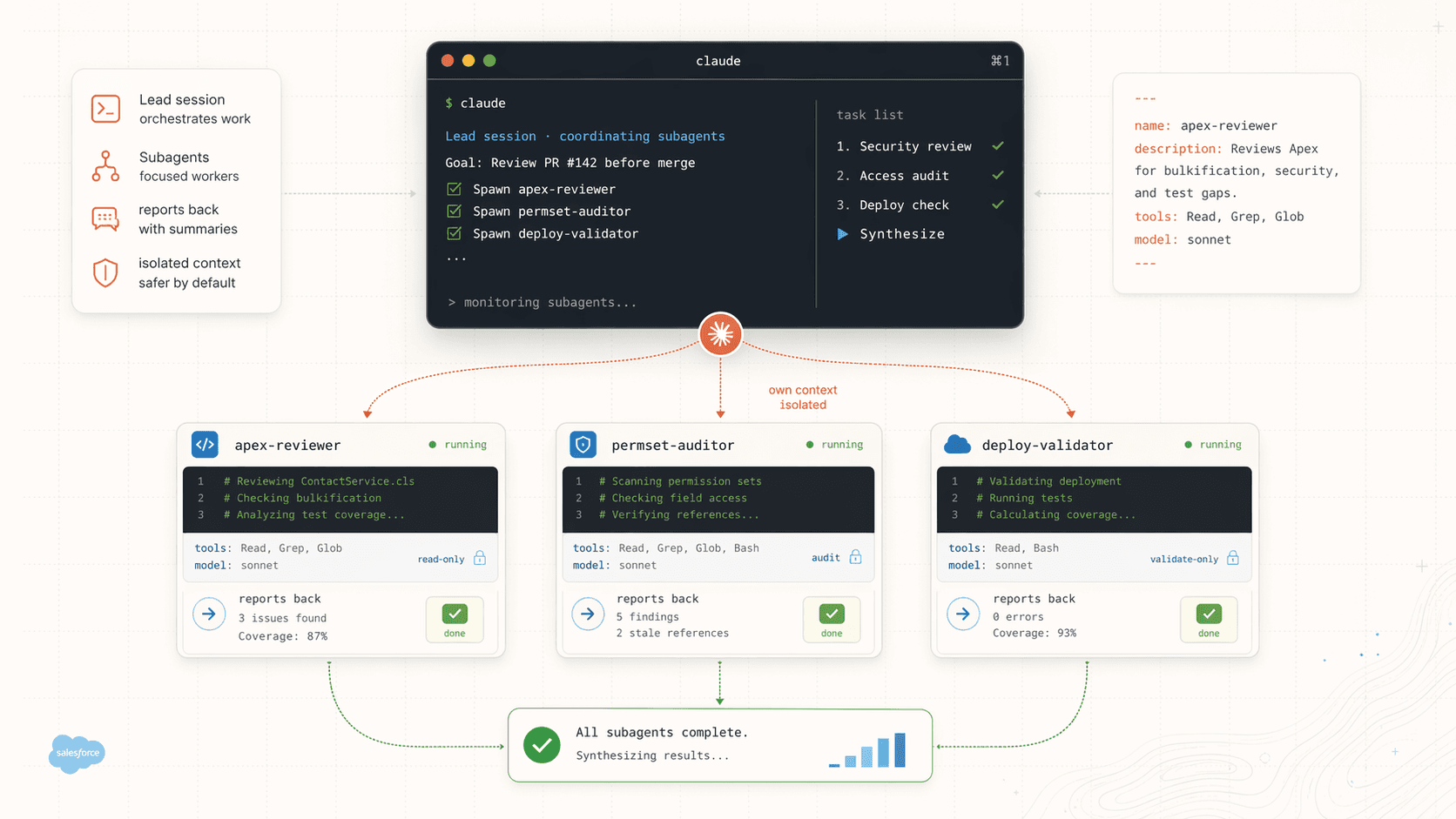
Where subagents live
Subagents are plain markdown files with YAML frontmatter.
~/.claude/agents/         # available to you in every project
.claude/agents/           # shared with the team via git
A minimal definition looks like this.
---
name: apex-reviewer
description: Reviews Apex classes for bulkification, governor limits, and test gaps.
tools: Read, Grep, Glob
model: sonnet
---

You are a senior Salesforce engineer reviewing Apex for production readiness.

Focus on:
- Bulkification and SOQL inside loops
- CPU, heap, and callout governor limits
- Sharing model and CRUD/FLS where relevant
- Test coverage gaps and assertion strength

Return a scored markdown report grouped by file. No code edits.
The tools line restricts what the subagent can do. For a reviewer, read-only tools are safer. For a scaffolder, give it Write and Edit.
Invoking a subagent
Three ways, in order of how often you'll use them.
- Mention by name. In your main prompt, say "use the
apex-reviewersubagent to checkContactService.cls." The lead agent spawns it. /agents. Lists every subagent Claude Code can see and lets you run one directly.- From another subagent or skill. A skill body can say "delegate to the
apex-reviewersubagent for any.clsfiles."
Subagent vs agent team
Both run multiple Claude sessions at once. The difference is coordination.
| Subagent | Agent team | |
|---|---|---|
| Who talks to whom | Worker reports back to caller only | Teammates message each other |
| Context | Own window, summary returns to caller | Own window, fully independent |
| Token cost | Lower | Higher |
| Best for | Narrow, independent jobs | Complex work needing discussion |
If no one needs to debate, use a subagent.
Five SF subagent patterns
1. Apex reviewer
Shown above. Hand it a class, get back a scored report with file-by-file findings. Pair it with the sf-apex skill if you have one installed.
2. Permission set auditor
---
name: permset-auditor
description: Audits permission sets and groups for stale references, missing FLS, and access drift.
tools: Read, Grep, Glob, Bash(sf org:list:metadata*)
model: sonnet
---

You audit permission set metadata in force-app/main/default/permissionsets/
and permissionsetgroups/.

For each permset:
- List every object, field, Apex class, tab, and page reference
- Flag references that no longer exist in force-app
- Flag missing FLS on custom fields used by LWCs or flows
- Output a table with severity (high, medium, info)
Useful before packaging or before hand-off to a customer's release team.
3. Deploy validator
---
name: deploy-validator
description: Runs validation-only deploys against a target org and summarises failures.
tools: Read, Bash(sf project deploy validate*), Bash(sf project deploy report*)
model: sonnet
---

Given a target org alias, run a validation-only deploy of the current
force-app source. Do not run destructive operations.

Return a summary with: test coverage, test failures, component errors.
Group errors by file. Do not attempt fixes.
Safe to run against customer sandboxes because the tool allowlist blocks anything destructive.
4. Flow test runner
---
name: flow-test-runner
description: Runs Flow tests across the project and reports coverage by flow.
tools: Read, Bash(sf flow test run*), Bash(sf flow test report*)
model: haiku
---

Run every Flow test in the project against the default org. Return a table
of flow name, tests run, pass rate, and coverage percentage.

Flag any flow below 75% coverage.
Haiku is fine here because the job is rote. Save Sonnet tokens for the harder work.
5. SOQL consultant
---
name: soql-consultant
description: Helps write and optimise SOQL. Does not execute queries without confirmation.
tools: Read, Grep, Bash(sf data query*)
model: sonnet
---

You help draft SOQL and explain query plans.

Rules:
- Never execute a query that returns more than 2000 rows without explicit approval
- Always prefer indexed fields (Id, Name, CreatedDate, custom indexed fields)
- For selective filtering, explain which field is driving selectivity
- For non-selective queries, suggest an index or a redesign
The explicit "never execute above N rows" line is the guardrail. Subagents follow system prompts carefully.
Or install a pre-built pod: Jag's FDE agents
If you ran the Jag's SF Skills full installer, you already have 7 production-grade subagents in ~/.claude/agents/. You don't need to write yours from scratch. Read theirs first; they're the clearest reference for production subagent frontmatter.
The pod is modeled after a real Forward Deployed Engineering team:
fde-strategist                     Plans, delegates up to 4 concurrent workers, no edits
├── FDE team (agent-specific)
│   ├── fde-engineer               Bot metadata, topics, actions, Apex, Agent Scripts
│   └── fde-experience-specialist  Persona, conversation design, utterances, LWC
├── Cross-cutting (both teams)
│   ├── fde-qa-engineer            Apex + agent testing, debug logs, session tracing
│   └── fde-release-engineer       Deploys, Connected Apps, Agent Script CLI, CI/CD
└── PS team (platform infrastructure)
    ├── ps-technical-architect     Service Apex, integrations, data, LWC, performance
    └── ps-solution-architect      Metadata, Flows, permissions, Mermaid diagrams
Every agent is a single .md file with YAML frontmatter declaring its model, permissionMode, tools, disallowedTools, and bound skills. The strategist runs in plan mode with Edit and Write disabled; the six implementers run in acceptEdits with a constrained tool allowlist.
The full roster
| Agent | Bound skills | Role |
|---|---|---|
fde-strategist | sf-ai-agentforce, sf-diagram-mermaid | Plans, researches, delegates. Never writes code. Only agent with the Task tool. |
fde-engineer | sf-ai-agentforce, sf-ai-agentscript | Bot metadata, topics, actions, Agent Scripts, invocable Apex |
fde-experience-specialist | sf-ai-agentforce-persona, sf-ai-agentforce, sf-lwc, sf-diagram-nanobananapro | Persona docs, utterance libraries, greetings, fallbacks, companion LWCs |
fde-qa-engineer | sf-testing, sf-debug, sf-ai-agentforce-testing, sf-ai-agentforce-observability | Apex test runs, agent conversation tests, topic classification checks, session trace analysis |
fde-release-engineer | sf-deploy, sf-connected-apps, sf-ai-agentscript | Dry-run deploys, Connected Apps, Agent Script CLI deploys, release pipelines |
ps-technical-architect | sf-apex, sf-integration, sf-connected-apps, sf-data, sf-soql, sf-debug, sf-deploy, sf-lwc | Service Apex, REST/SOAP endpoints, Named Credentials, data model, LWCs the platform depends on |
ps-solution-architect | sf-metadata, sf-flow, sf-permissions, sf-testing, sf-diagram-mermaid | Custom objects and fields, Flows with fault paths, permission set groups, architecture diagrams |
Invoking the pod
You don't address the specialists. You ask the strategist and it plans, delegates, and consolidates:
Use the fde-strategist agent. Goal: stand up a Customer Service Triage
Agentforce agent for ACME in the acme-uat org. Topics for warranty,
billing, and shipping. Include a companion LWC, a Connected App for the
mobile channel, and an agent test suite covering all three topics plus
an ambiguous utterance. Target org alias: acme-uat. Never deploy to
anything containing "prod".
A plausible plan:
ps-solution-architectdrafts objects, permset group, and a Mermaid architecture diagram.fde-engineerscaffolds bot metadata, topics, and invocable Apex.fde-experience-specialistwrites the persona doc and LWC in parallel with step 2.ps-technical-architectbuilds service Apex for the actions.fde-qa-engineercreates the agent test suite and Apex tests.fde-release-engineerruns a dry-run deploy againstacme-uatand reports.
Up to four of those run concurrently. The strategist consolidates and asks before anything gets deployed.
Read the .md files even if you don't use the pod
The 7 files under ~/.claude/agents/ are a masterclass in production subagent briefs: scope, permission mode, tool allowlist, skill binding, memory scope, and max-turn budget. If you're writing your own subagent, copy the shape from the agent closest to your use case.
See Jag's SF Skills for the install path.
Writing a good subagent
Four things make the difference between a useful subagent and a wasted turn.
- One job. "Reviewer" beats "reviewer and refactorer and doc writer." If it's two jobs, make two subagents.
- Narrow tool allowlist. Don't give a reviewer
Write. Don't give a query helperBash(*). - Return format. Say explicitly what comes back: markdown table, PR diff, JSON, a short summary. Vague output means a vague result.
- Hard constraints. Write them as rules in the body. "Never X. Always Y." The agent follows them.
When to skip a subagent
- The task is a single step your main agent can do in one turn.
- The work needs live back-and-forth and you aren't ready to write a brief.
- The files the subagent needs are already loaded in your main context. Spawning just re-reads them.
Subagents are also not free. Each one burns a fresh context window. Three narrow subagents are usually cheaper than one agent trying to hold the whole world, but one subagent spawned for a 200-token task is just waste.
Next
- Agent Teams for when the workers need to coordinate instead of just reporting back.
- Skills for capability packs a subagent can load.
- Hooks and Custom Commands for automation that kicks off a subagent on its own.