
Configuring for Salesforce
CLAUDE.md, slash commands, skills, and settings that make Claude Code useful for SE work.
Out of the box, Claude Code is a generalist. For Salesforce work you want it to know about sf, Apex conventions, your org aliases, and which operations require a human in the loop. You teach it that through a handful of files in .claude/ and AGENTS.md.
This page walks through the layers and gives you a starter set.
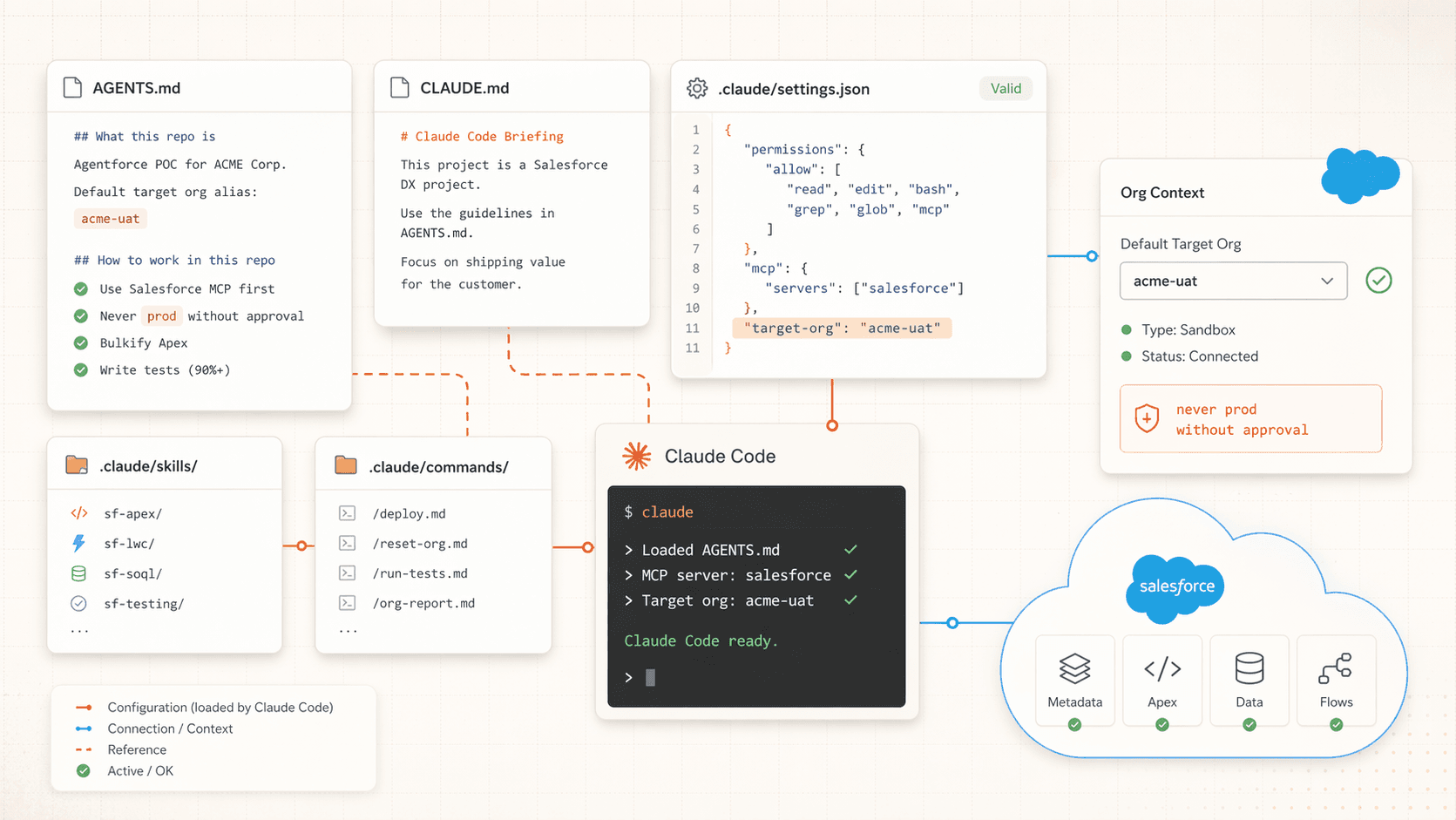
The layers
Claude Code reads config from several places in this order:
| Layer | Location | Scope |
|---|---|---|
| Repo briefing | AGENTS.md at repo root | This repo |
| Claude-specific briefing | CLAUDE.md at repo root | This repo |
| Project settings | .claude/settings.json | This repo |
| Project skills | .claude/skills/*/SKILL.md | This repo |
| Project commands | .claude/commands/*.md | This repo |
| Project subagents | .claude/agents/*.md | This repo |
| Personal settings | ~/.claude/settings.json | You, globally |
| Personal skills | ~/.claude/skills/*/SKILL.md | You, globally |
| Personal commands | ~/.claude/commands/*.md | You, globally |
You don't need all of these. Start with AGENTS.md and one slash command. Add layers when you catch yourself repeating instructions.
AGENTS.md or CLAUDE.md?
Both are read. AGENTS.md is the cross-tool convention (Cursor reads it too). CLAUDE.md is Claude-Code-specific and still supported. Use AGENTS.md unless you need to say something only to Claude Code. The deep dive on AGENTS.md lives in Rules & AGENTS.md.
A starter setup
Let Claude Code scaffold itself
From your project root:
claudeThen run:
/initClaude Code inspects the repo and writes a first-pass CLAUDE.md with what it learned. Read it. Fix anything wrong. You can (and should) move the useful bits into AGENTS.md so Cursor sees them too.
Write a concrete AGENTS.md
A good starter for a Salesforce POC:
# AGENTS.md

## What this repo is

An Agentforce + Data 360 POC for ACME Corp. The agent triages inbound
cases and drafts replies using related Knowledge articles. Stakeholder:
`jane.doe@acme.com`. Default target org alias: `acme-uat`.

## How to work in this repo

- Use the Salesforce MCP for org operations. Fall back to `sf` CLI only
  if the MCP can't do it.
- Default target org is `acme-uat`. Never deploy to an alias containing
  `prod` without explicit confirmation in chat.
- Apex: bulkify, `with sharing` by default, matching test class with 90%
  coverage.
- LWC: `isExposed=true` with at least one target, SLDS utility classes,
  aria attributes on interactive elements.
- Redact any customer PII before it lands in chat, logs, or commits.

## Project layout

- `force-app/main/default/agents/` is the Agentforce definition.
- `force-app/main/default/lwc/` is companion LWCs.
- `scripts/` has `reset.sh`, `seed.sh`, and `teardown.sh` for rehearsals.
- `docs/` holds handoff documentation.

## Who to ask

- Dylan (`dylan.andersen@salesforce.com`) owns Agentforce.
- Jane (`jane.doe@acme.com`) is the customer stakeholder.
Keep it short. If a senior engineer wouldn't guess it from the code, write it down.
Install the Salesforce skills you'll use
Skills are deep playbooks with scoring rubrics and reference material. For SE work, a small set covers most daily tasks:
sf-apex
Generate and review Apex with a 150-point rubric covering bulkification, sharing, tests, and governor limits.
sf-lwc
Lightning Web Components with the PICKLES methodology: properties, imports, CSS/SLDS, keyboard nav, Lightning Data Service, events, Jest tests.
sf-soql
SOQL query generation, optimization, and selective-query review.
sf-testing
Apex test execution and coverage fix loops.
sf-ai-agentforce
Builder-managed topics, actions, and GenAiPlugin metadata.
sf-debug
Debug log triage with governor-limit analysis.
Skills live in ~/.claude/skills/<skill-name>/SKILL.md. Once installed, Claude Code auto-loads them when a task matches their trigger description.
The full skill library and install guidance is in Using Skills. Skills are shared between Cursor and Claude Code.
Add a few slash commands
Slash commands are frozen prompts you can invoke with a single /command-name. They live in .claude/commands/<name>.md (project) or ~/.claude/commands/<name>.md (personal).
A deploy-safe slash command:
---
description: Deploy current branch changes to the default org with a dry run first
---

Do the following, in order:

1. Run `git diff --name-only main...HEAD` and list every file that changed.
2. If any changed file is under `force-app/`, run
   `sf project deploy start --dry-run --target-org $(sf config get target-org --json | jq -r '.result[0].value')`
   and show me the output.
3. If the dry run passes, ask me to confirm before running the real deploy.
4. On confirmation, run `sf project deploy start` against the same target org.
5. Never deploy to an alias containing `prod`.
Save that as .claude/commands/deploy.md. Now /deploy is one keystroke away.
A few others worth writing:
/test-apexforsf apex run test --code-coverageon changed classes/scratchfor a fresh scratch org fromconfig/project-scratch-def.json/reset-demofor the demo-rehearsal reset flow/handoffto generate a customer-facing handoff doc
Lock down sensitive tools in settings.json
.claude/settings.json controls which tools Claude Code can use without asking. For Salesforce work, the default-deny list is more important than the allow list:
{
  "permissions": {
    "allow": [
      "Read(**)",
      "Edit(**)",
      "Bash(sf:*)",
      "Bash(git:*)",
      "Bash(npm:*)"
    ],
    "deny": [
      "Bash(sf org delete:*)",
      "Bash(sf project delete:*)",
      "Bash(sf data delete:*)",
      "Bash(git push --force:*)",
      "Bash(rm -rf:*)"
    ]
  }
}
The deny list short-circuits destructive operations before they reach the approval prompt. Deploys, logins, and queries still work; deletes, force pushes, and mass rm -rf require you to edit settings or run the command yourself.
(Optional) Add a PII-redaction hook
Hooks fire on specific events. The most useful for SE work is PreToolUse, which can inspect and block a tool call before it runs. Add to .claude/settings.json:
{
  "hooks": {
    "PreToolUse": [
      {
        "matcher": "Bash",
        "hooks": [
          {
            "type": "command",
            "command": "scripts/redact-pii-check.sh"
          }
        ]
      }
    ]
  }
}
scripts/redact-pii-check.sh reads the proposed command on stdin and exits non-zero if it sees an email address, phone number, or SSN pattern. Claude Code will refuse to run the command. Useful before the first customer demo goes wrong.
Skills vs commands vs rules
Three tools, three shapes. Don't confuse them:
- Shape: one Markdown file per command under
.claude/commands/or~/.claude/commands/. - When: you run a specific prompt repeatedly and want it on a hotkey.
- Examples:
/deploy,/reset-demo,/handoff,/test-apex. - Think: "shell alias for a prompt".
- Shape: a folder under
.claude/skills/<name>/or~/.claude/skills/<name>/withSKILL.mdand optional reference material. - When: you need deep domain knowledge with a scoring rubric and examples.
- Examples:
sf-apex,sf-lwc,sf-ai-agentforce-testing. - Think: "senior reviewer you loaned to the agent".
- Shape: a single
AGENTS.md(and optionallyCLAUDE.md) at the repo root. - When: "this is our project, these are our defaults, don't forget them".
- Examples: target org alias, conventions, who owns what.
- Think: "onboarding doc for any agent that opens this repo".
The promotion ladder
Start with a prompt. Promote it to a slash command when you catch yourself retyping it. Promote the command to a skill when the instructions grow examples, rubrics, and reference material. Don't skip ahead. A tight four-line slash command beats a sprawling skill no one reads.
What to check into Git
- Do commit:
AGENTS.md,CLAUDE.md,.claude/commands/,.claude/skills/,.claude/agents/,.claude/settings.json. - Do not commit:
.claude/settings.local.json(personal overrides),.claude/*.cache, anything under.claude/with secrets.
Add to .gitignore if you haven't:
.claude/settings.local.json
.claude/**/*.cache
Next Steps
- Do the hands-on loop in Your First Session.
- Once the loop feels natural, move into Advanced Claude Code for subagents, agent teams, skills, plugins, and hooks.
- Deep dive on the skills library in Using Skills.
- Wire the agent to a live org with MCP Setup.