
Cursor vs Claude Code
When to reach for Claude Code, when to stay in Cursor, and how to run both on the same Salesforce project.
Cursor and Claude Code are both AI coding agents. They can run on the same repo, read the same files, hit the same MCP servers, and call the same underlying models. The difference is surface area.
For a Salesforce SE, both have a place. This page gives you a decision framework so you can pick the right surface for the task in front of you.
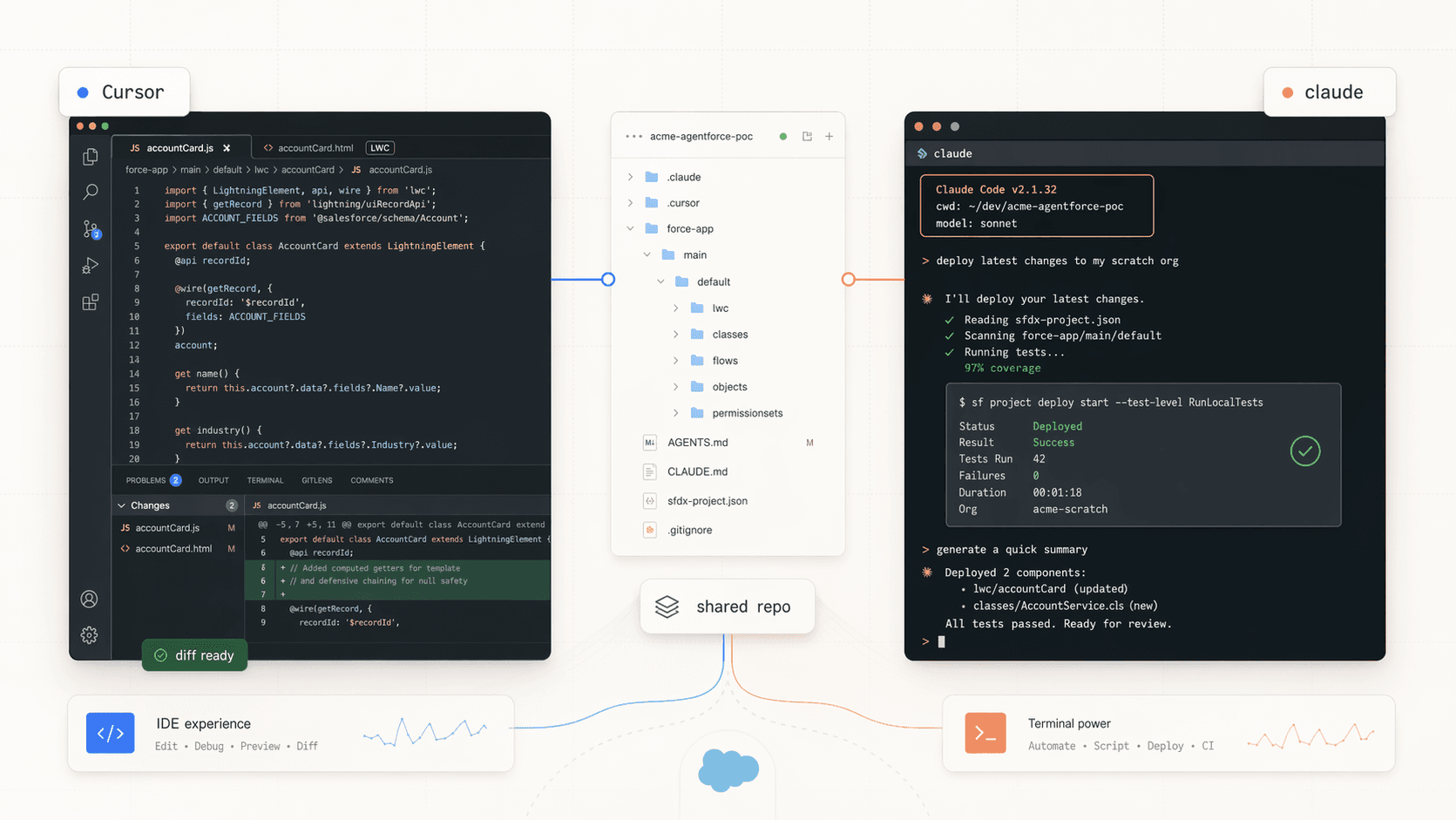
- Cursor is an IDE with AI baked in. You see files, tabs, inline diffs, a chat panel, and the full VS Code extension ecosystem.
- Claude Code is an agent in your terminal. No IDE. You talk to it, it reads and edits files in the current directory, and it plays nicely with scripts, pipes, and CI.
Mental model
| Cursor | Claude Code | |
|---|---|---|
| Where it runs | IDE window | Any terminal |
| Best for | Iterative code edits, LWC preview, Apex debugging, visual review | Scripted workflows, long refactors, CI, headless automation |
| Interaction | Chat panel, inline edits, Tab completion, Agent mode | Conversation in the terminal, / slash commands, piped prompts |
| Project config | .cursor/rules/*.mdc, AGENTS.md | .claude/, CLAUDE.md, AGENTS.md |
| Parallelism | Background agents | Subagents, headless claude -p in scripts |
| Extensions | VS Code extension marketplace | Slash commands, skills, hooks |
| Org tooling | Salesforce Extension Pack + MCP | Salesforce CLI + MCP |
Both read AGENTS.md, both can consume MCP servers, and both can work on the same repo at the same time. They are not in competition.
When Cursor wins
🎨 LWC iteration with live preview
Cursor + Salesforce Live Preview + Hot Module Reload gives you a fast visual loop. Claude Code can edit the files, but you'd still flip to a browser to see the result.
🐞 Apex debugging
Apex Log Analyzer, breakpoints, and the Replay Debugger all live in the IDE. You want that UI when you're chasing a governor limit.
🔍 Visual diff review
Cursor's diff view, inline edits, and Tab autocomplete are the tightest loop for hand-tuning code the agent just generated.
🧭 Exploring an unfamiliar customer org
Clicking through files in the sidebar with Cmd+P beats asking an agent to list directories.
When Claude Code wins
🎬 Scripted POC rehearsals
Headless `claude -p 'reset this scratch org from config/scratch-def.json'` inside a shell script is a first-class citizen. In Cursor this is awkward.
🌳 Long, branching refactors
Subagents let Claude Code hand off work: one analyzes metadata, another rewrites Apex, another validates tests. It runs these in parallel in the background.
⚙️ CI and pre-commit hooks
Claude Code runs in any pipeline that can install a CLI. Use it for PR reviews, metadata lint, or automated handoff docs.
⌨️ Terminal-first workflows
If you live in `tmux` or prefer a Vim-shaped brain, Claude Code fits the muscle memory.
What they share
Both agents are happy on the same project at the same time. They share:
- The repo and Git history. Commits made by one show up to the other immediately.
AGENTS.mdat the repo root. Write your project briefing once and both read it.- MCP servers. A Salesforce MCP configured for one works for the other with a small config change. See MCP Setup for the canonical setup.
- The Salesforce CLI. Both drive
sf project deploy,sf org login web, and the rest.
One AGENTS.md, two agents
If you already wrote an AGENTS.md for Cursor (see Rules & AGENTS.md), Claude Code will read it automatically. You don't need a second briefing doc. CLAUDE.md is the older Claude-Code-specific file, still supported, but AGENTS.md is the cross-tool convention.
Using both together
A common SE pattern:
- Cursor for building: write the Apex class, iterate the LWC, tune the Flow. Visual, hands-on, tight loop.
- Claude Code for automating: run
scripts/reset.shthat callsclaude -p "seed the scratch org with demo data from fixtures/". Schedule deploys. Generate handoff docs. - Either for agentic POCs: pick whichever you're faster in. For a demo-reset script you'll run a hundred times, Claude Code. For "let me finish this LWC before the customer call in 20 minutes", Cursor.
Don't pick one and stop
Most SEs end up using both. The shared repo, shared AGENTS.md, and shared MCP setup mean there's no switching cost. Use whichever is in front of you.
Quick decision helper
- Finish a Flow or LWC in the next 10 minutes → Cursor
- Debug an Apex governor limit → Cursor (log analyzer)
- Reset a demo org every morning → Claude Code in a script
- Generate a POC handoff doc → either; skill-based reviews run well in Claude Code
- Build one agent that orchestrates many sub-tasks → Claude Code subagents
- Refactor 40 Apex classes overnight → Claude Code with a plan
- See files and edits visually → Cursor
- Stay in the terminal → Claude Code
- Pipe AI output into another CLI tool → Claude Code (
claude -psupports stdin/stdout) - Scrub a log file with a human in the loop → Cursor, faster to jump around
- Build a reusable skill or slash command → Claude Code first; Cursor can consume the same conventions
Next Steps
- Set up Salesforce-specific config in Configuring for Salesforce.
- Run your first real session in Your First Session.
- If you're coming from the Cursor side, skim Rules & AGENTS.md so the shared conventions line up.