
CLI Composition
Pipe sf CLI output into Claude, pipe Claude's answers into other commands, and compose Salesforce tooling the way Unix composes. The one feature Cursor cannot match.
The single biggest thing Claude Code can do that Cursor cannot is participate in a shell pipeline. Anything that fits on stdin becomes context. Anything Claude returns is just more text that you can pipe into jq, rg, sf, git, or the next invocation of claude. This page is how SEs turn that into speed on customer POC work.
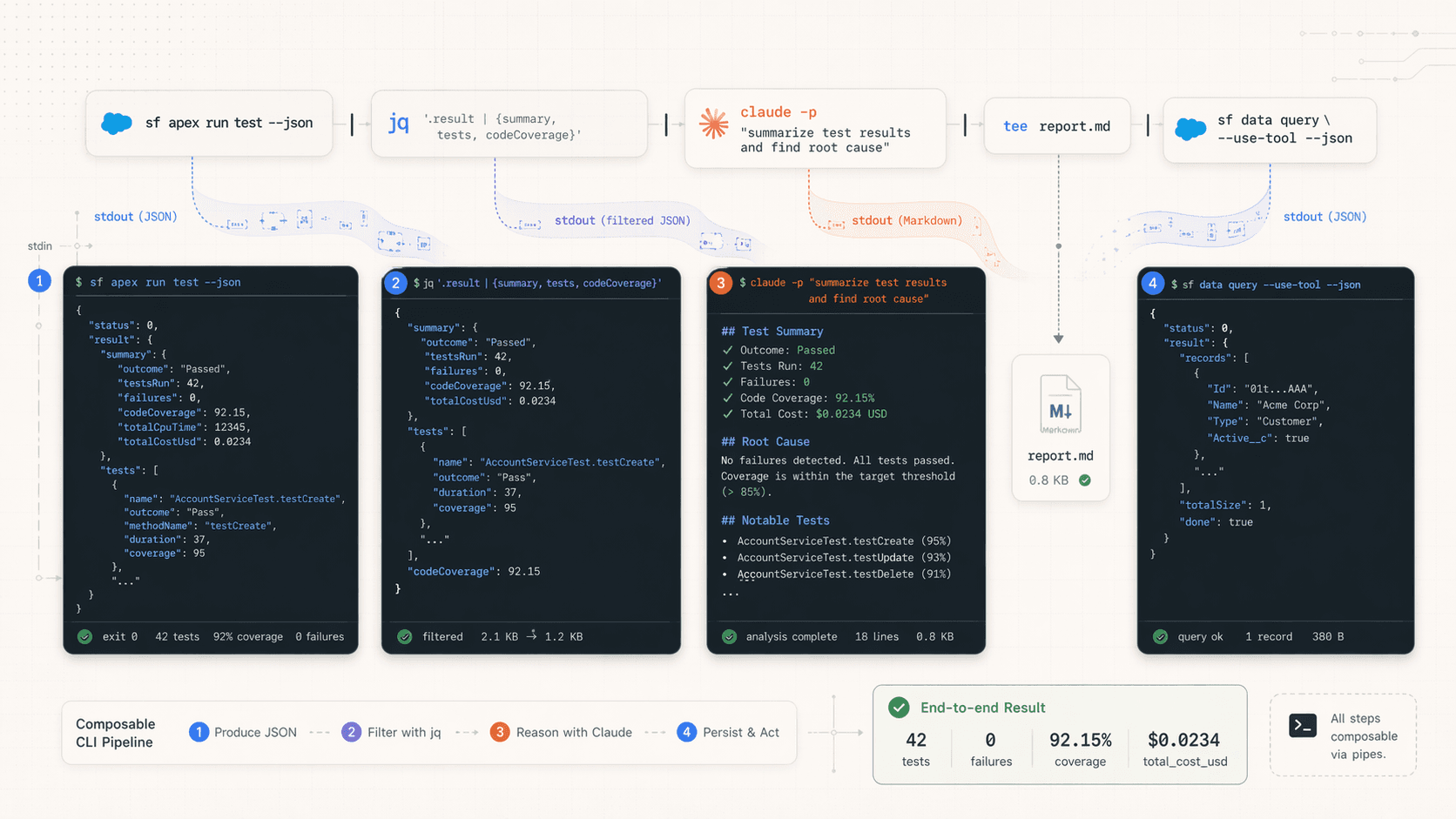
The one-line mental model
<something that produces Salesforce signal> | claude -p "<what to do with it>"claude -p "..." runs one turn non-interactively and prints the answer. No session. No approval loop. Just text in, text out. That one primitive, combined with sf, covers a surprising amount of SE work.
The sf commands worth knowing in this shape
Not every sf command is useful piped. These are the ones that produce dense, useful signal for Claude:
| Command | Signal it produces | Typical follow-up |
|---|---|---|
sf apex run test --result-format json | Full test run with coverage and failures | "Explain failures, propose fixes" |
sf apex get log --log-id <id> --json | Raw debug log with CPU, SOQL, heap data | "Find the governor limit I hit" |
sf project deploy start --dry-run --json | Validation errors and test failures | "Group errors by root cause" |
sf data query --query "..." --result-format json | Query results | "Summarize these records" |
sf data360 query --query "..." | Data 360 SQL / vector search results | "What's driving this segment?" |
sf agent test run --api-name <name> --json | Agentforce test suite results | "Which topics regressed?" |
sf org list --json | Every authed org with expiry and alias | "Which orgs are close to expiring?" |
sf project retrieve preview | Metadata delta between repo and org | "Is anything surprising here?" |
All of these accept --json or --result-format json. Always ask for JSON when piping. Claude can parse anything, but JSON keeps the turn cheap.
Five SE pipelines that pay for themselves
1. Apex test failure triage
After a sf apex run test, the JSON is dense and human-hostile. Pipe it in:
sf apex run test --class-names AccountServiceTest ContactServiceTest \
  --code-coverage --result-format json --wait 10 \
  | claude -p "Parse this test run. For each failure, summarize the root cause in one sentence and suggest the fix. Group by class. Only use the stack trace and message fields."
This turns a wall of JSON into a tight summary you can paste into a PR description or a Slack update during a customer demo rehearsal.
2. Debug log governor-limit hunt
You just hit a limit on a bulk insert and you're 12 minutes from a demo. Don't read the log manually:
sf apex get log --log-id 07L... --json \
  | claude -p "This is a Salesforce debug log. Tell me: which governor limit was hit, which method or trigger caused it, and the smallest code change that fixes it. Cite the line numbers."
Claude reads the log, anchors on LIMIT_USAGE_FOR_NS lines, finds the offender, and tells you where to look. Minutes, not hours.
3. Deploy validation triage against a customer sandbox
Before pushing to the customer's UAT, you dry-run. You usually get 40 errors that are actually 3 real problems plus cascading noise:
sf project deploy start --dry-run --target-org acme-uat --json \
  | claude -p "Group these deploy errors by root cause. For each group, list the affected files and suggest the fix. Ignore cascading errors that go away once the root cause is resolved."
This is the single best use of claude -p for POC work. It turns "40 errors" into "3 problems, fix order".
4. Agentforce test regression sweep
You're 48 hours from a customer demo and need to know which agent topics regressed overnight:
sf agent test run --api-name CustomerServiceAgentTests \
  --target-org acme-uat --result-format json --wait 20 \
  | claude -p "This is an Agentforce test run. List every utterance that failed, what topic it was expected to route to, and what actually happened. Flag anything that looks like topic contamination."
Pipe the output into tee if you want a copy on disk too:
sf agent test run ... --json \
  | tee tests/last-run.json \
  | claude -p "..."
5. Data 360 segment sanity check
When a segment size jumps or drops unexpectedly before an activation demo:
sf data360 query --target-org acme-dc --query \
  "SELECT COUNT(*) AS cnt FROM HighValueCustomers__dlm WHERE LastPurchaseDate__c > '2026-01-01'" \
  --result-format json \
  | claude -p "Explain what this count tells me about the segment. Then suggest three follow-up queries to understand why it's this size."
Going the other direction: pipe Claude into sf
Less common but sometimes the right shape. Use --output-format json to get structured output you can feed back to sf:
claude -p "Generate a SOQL query that returns the 10 Opportunities most likely to close this quarter, based on StageName, Amount, and CloseDate. Return only the SOQL, no explanation." \
  --output-format text \
  | xargs -I {} sf data query --query "{}" --target-org acme-uat
Trust but verify
Always echo the generated query before piping it to sf. Claude will sometimes invent field names if the schema isn't in context. For anything that writes, run the generated output through your eyes first.
Composing with jq and other tools
Claude is a great pipe stage, not the only one. Often the best shape is sf → jq (to slice) → claude (to interpret).
sf apex run test --result-format json --wait 10 \
  | jq '.result.tests[] | select(.outcome == "Fail") | {className: .ApexClass.Name, methodName: .MethodName, message: .Message, stackTrace: .StackTrace}' \
  | claude -p "Triage these failures."
jq strips out the 90% you don't need. Claude gets a tight input. The turn is cheaper and sharper.
Output formats worth knowing
claude -p "..." --output-format text        # default, just the answer
claude -p "..." --output-format json        # answer plus session-id, model, cost
claude -p "..." --output-format stream-json # streaming, useful for long answers
json is the one you want in scripts. It gives you session_id, total_cost_usd, and model name back, so you can log what each script run cost.
sf project deploy start --dry-run --json \
  | claude -p "Summarize errors." --output-format json \
  | jq -r '"Cost: $\(.total_cost_usd)  |  " + .result'
The skip-permissions switch
For fully non-interactive automation (CI, cron), you can waive the per-tool approval prompt:
claude -p "..." --dangerously-skip-permissionsNever use this outside a sandbox
--dangerously-skip-permissions turns off the seat belt. Use it only in ephemeral environments (GitHub Actions runners, scratch-org-only scripts, dev containers). Never in a session that has auth to a customer production org. The deny list in .claude/settings.json is a backstop but not a substitute for judgment.
Three patterns to avoid
- Piping a whole customer sandbox retrieve through Claude. You'll spend $5 on a single turn and most of the content will be irrelevant metadata. Use
jqorrgfirst to scope. - Using
claude -pinside a loop over 200 records. Every iteration is a new turn and a new bill. Batch the records into one prompt. - Ignoring exit codes.
claude -pexits non-zero on errors. In scripts, check$?or useset -eso a silent failure doesn't leave your demo script in a bad state.
Cheatsheet
# Apex test failures
sf apex run test --json | claude -p "Triage failures."

# Debug log
sf apex get log --log-id $ID --json | claude -p "Find the governor limit I hit."

# Deploy errors
sf project deploy start --dry-run --json | claude -p "Group errors by root cause."
# Summarize records
sf data query --query "SELECT Id, Name FROM Account LIMIT 50" --json \
| claude -p "What patterns do you see in these account names?"
# Data 360 SQL
sf data360 query --query "SELECT ..." --result-format json \
| claude -p "Explain this result."# SOQL from intent
claude -p "SOQL: top 10 renewal Opps this quarter. Return only SOQL." \
--output-format text
# Apex test stub from a class body
cat force-app/main/default/classes/MyService.cls \
| claude -p "Write an Apex test class with 90% coverage. Return only the .cls body."# Block commits that touch a prod-aliased file
git diff --cached --name-only \
| claude -p "Do any of these files look like they shouldn't be committed? Exit non-zero if yes." \
--output-format text \
&& git commit -m "..."Combine with --dangerously-skip-permissions only in ephemeral environments.
Next
- Run many of these pipelines in parallel in Multi-Terminal Orchestration.
- Wrap pipelines into reusable shell scripts in Headless Automation.
- Run the same pipelines in GitHub Actions for PR review in CI Reviews & Handoff.
Multi-Terminal Orchestration
Run six Claude Code sessions in parallel across Warp panes or tmux windows, each driving a different slice of a customer POC. One keyboard, six concurrent agents.
Headless Automation
Wrap Claude Code into shell scripts, cron jobs, and repeatable demo harnesses. Turn POC overhead into one-liners.