
Checkpoints & Time Travel
Resume sessions by ID, rewind to any prior turn, branch a POC session into parallel experiments, and recover from demo-day disasters without losing context.
Claude Code sessions are durable. Every message you send and every file-edit you approve is persisted. That means you can close your laptop, walk into a customer meeting, come back two hours later, and continue from the exact same context. You can also rewind a session like a save state, branch it, and recover a demo that just went sideways. Cursor's checkpoints are file-level. Claude Code's are conversational. That difference matters during a POC.
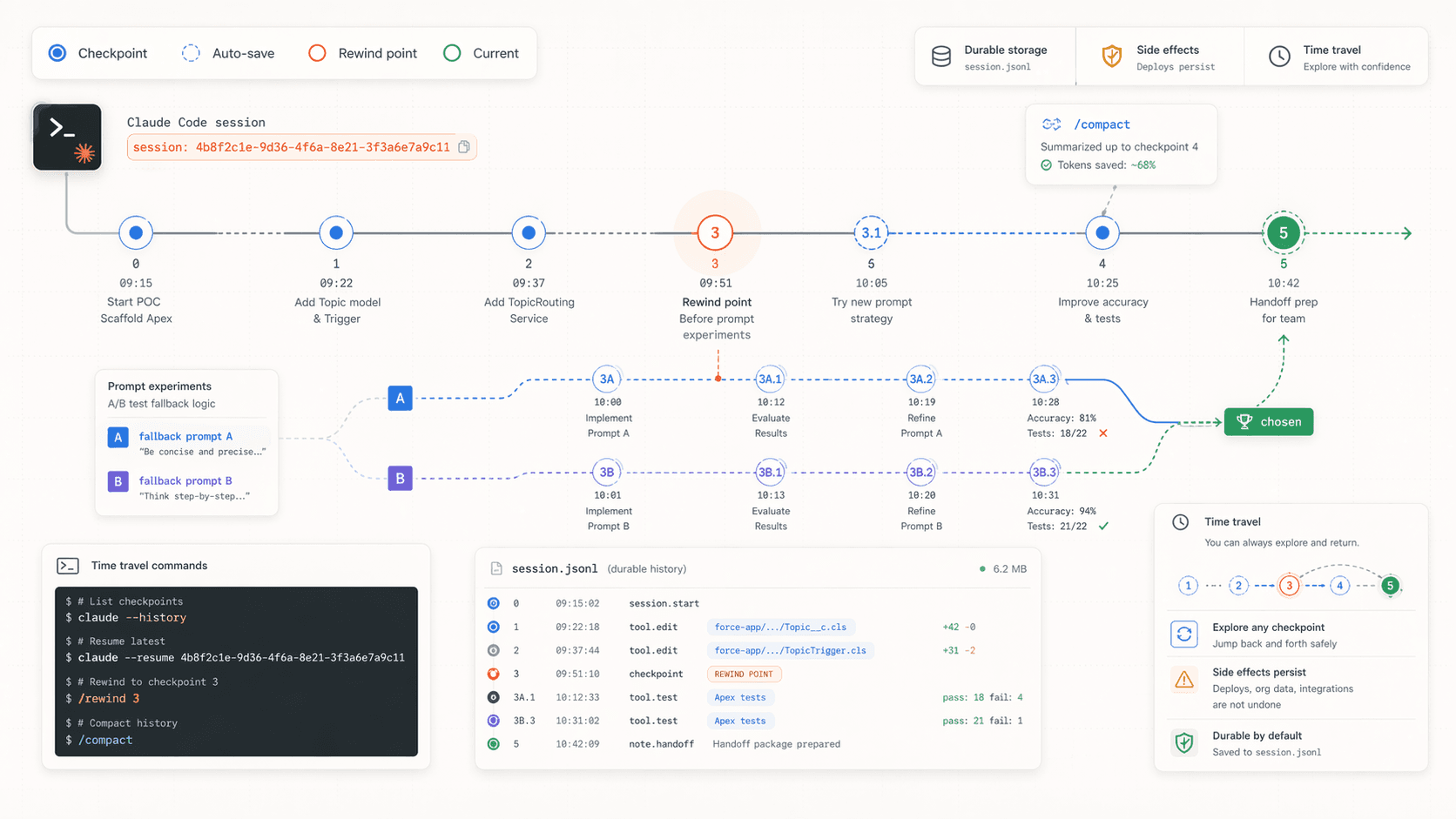
The three primitives
claude --resume <session-id>   Pick up a prior session exactly where it left off.
/rewind <n>                    Inside a session, drop the last n messages and their edits.
/compact                       Shrink context while keeping the important bits.
Those three cover more than they sound like.
Finding and resuming a session
Every session has an ID. You can see it with --output-format json on the first turn, or by looking at the history file:
# List recent sessions
ls -lt ~/.claude/projects/$(pwd | sed 's|/|-|g')/*.jsonl | head

# Resume a specific one
claude --resume 4b8f2a10-6d3c-4f7e-9a5b-1c2d3e4f5a6b
Or interactively:
claude --continue       # continue the most recent session in this folder
claude --resume         # interactive picker of recent sessions
Where sessions live
~/.claude/projects/<folder-path-hash>/*.jsonl is one file per session. You can grep it, back it up, commit it to a private repo, or ship it to a teammate as evidence of what happened. Cursor has no equivalent.
SE use case: one session per customer concern
A POC has threads that stretch across days. Keep one session alive per concern, resume it when you need it:
Tag sessions at start
At the beginning of every new session for a concern, ask Claude to tag itself:
You are the Agentforce agent designer for Acme's POC.
Focus: the CustomerServiceAgent topic routing and fallbacks.
All changes go in force-app/main/default/genAiPlugins/CustomerServiceAgent/.
That first message becomes the session's identity. Anyone resuming it knows immediately what it was for.
Save the session ID
Grab it from the session's first --output-format json turn, or from the sessions picker. Store it in docs/poc-sessions.md:
# Acme POC sessions

| Concern                       | Session ID                              |
| ----------------------------- | --------------------------------------- |
| Agent topic routing           | 4b8f2a10-6d3c-4f7e-9a5b-1c2d3e4f5a6b    |
| LWC case surface              | 9f3e1c22-8b4d-4e6a-9c1f-2a3b4c5d6e7f    |
| Data 360 segment tuning     | 17a2b3c4-d5e6-4f78-9abc-def012345678    |
Check this file into the repo. Now any SE on the account can resume any of these threads.
Resume into the same pane
Back in your six-pane layout, pane 1 (agent metadata) always boots with:
claude --resume 4b8f2a10-6d3c-4f7e-9a5b-1c2d3e4f5a6bSame thread, same context, same file assumptions. Week 2 of the POC picks up exactly where week 1 ended.
Rewinding: the POC save state
/rewind drops the last N turns and any file edits they made. It is the single most useful thing during a demo-day disaster.
Example: mid-demo recovery
You're live on a customer call. Fifteen minutes in, Claude just made a change to the agent's fallback prompt that broke a topic. The customer is watching.
/rewind 3Three turns gone. The file edits are undone. Claude's context is back to where it was four minutes ago. Keep going.
Example: A/B a design decision
You want to see which prompt wording routes better. Make change A, test, save the session ID, rewind to before change A, make change B, test. Compare. Keep the winner.
/rewind 5
# now try the alternative approach
This is a branching-without-branching trick. You don't need git if the question is purely about conversation context.
/rewind undoes edits, not deploys
/rewind rolls back the files Claude edited in those turns. It does not roll back anything you deployed to an org, any records you inserted, or any external side effects. For those you still need sf project deploy backwards, sf data cleanups, or git revert on committed state.
/compact: context cleanup without losing context
When a session gets long (20+ turns, lots of file reads, lots of tool output), context pressure builds. /compact tells Claude to summarize the conversation so far into a tight brief, then continues from the brief.
/compactUse this:
- Mid-POC when switching sub-concerns. "We just finished the topic routing work; compact, then we start on the fallback prompt."
- Before handing off to a teammate. Compact creates a readable summary that your teammate can scan when they
--resumethe session. - When Claude starts repeating context. A tell-tale sign the session is full.
You can also compact with a custom instruction:
/compact Focus on the decisions we made about topic ordering, not the prompt experiments.That shapes the summary toward what will matter next.
Branching a session properly
For real branching (not just rewind-and-try), clone the session file:
# Find the session file
SESSION=~/.claude/projects/-Users-you-code-acme-poc/4b8f2a10-*.jsonl

# Copy it
cp "$SESSION" ~/.claude/projects/-Users-you-code-acme-poc/$(uuidgen).jsonl
You now have two identical sessions. Resume each separately and they diverge. Useful for "we want to explore two very different approaches and we want a real record of both".
Back up session files before a big demo
Before a customer demo, cp the active session file somewhere safe. If the demo blows up mid-call, you can restore the backup and --resume into a known-good state.
Session logs as handoff artifacts
Every session is a .jsonl file. Every turn is a line. You can:
jqthrough it to find when a decision was made.- Ship the file (sanitized) as part of POC handoff so the customer's team can see the reasoning.
- Grep for a specific error message to find the turn where it first appeared.
jq 'select(.type == "user") | .message.content' \
  ~/.claude/projects/-Users-you-code-acme-poc/4b8f2a10-*.jsonl \
  | less
Cursor has nothing like this. Its "history" is ephemeral.
Putting it all together: a POC week shape
| Day | Action |
|---|---|
| Monday | Start 4 sessions, one per concern. Tag each clearly. Record IDs in docs/poc-sessions.md. |
| Tues–Thurs | Resume sessions as needed. /compact end-of-day to keep them tidy. Rewind freely during exploration. |
| Friday | Branch a "handoff-doc" session from the architecture-owning session. Use it to generate the doc. |
| Weekend | Back up session files before Monday's demo. |
| Demo Monday | If anything breaks mid-demo, /rewind first, restore backup second, apologize third. |
Next
- Multi-Terminal Orchestration for running multiple resumed sessions in parallel.
- CLI Composition for the headless counterpart.
- Hooks & Commands to automate
/compactor session backups.
Headless Automation
Wrap Claude Code into shell scripts, cron jobs, and repeatable demo harnesses. Turn POC overhead into one-liners.
CI Reviews & Handoff Automation
Run Claude Code in GitHub Actions to review POC PRs, summarize metadata deltas between demos, and generate handoff docs on every tag. Zero-click artifacts for the customer.