
Multi-Terminal Orchestration
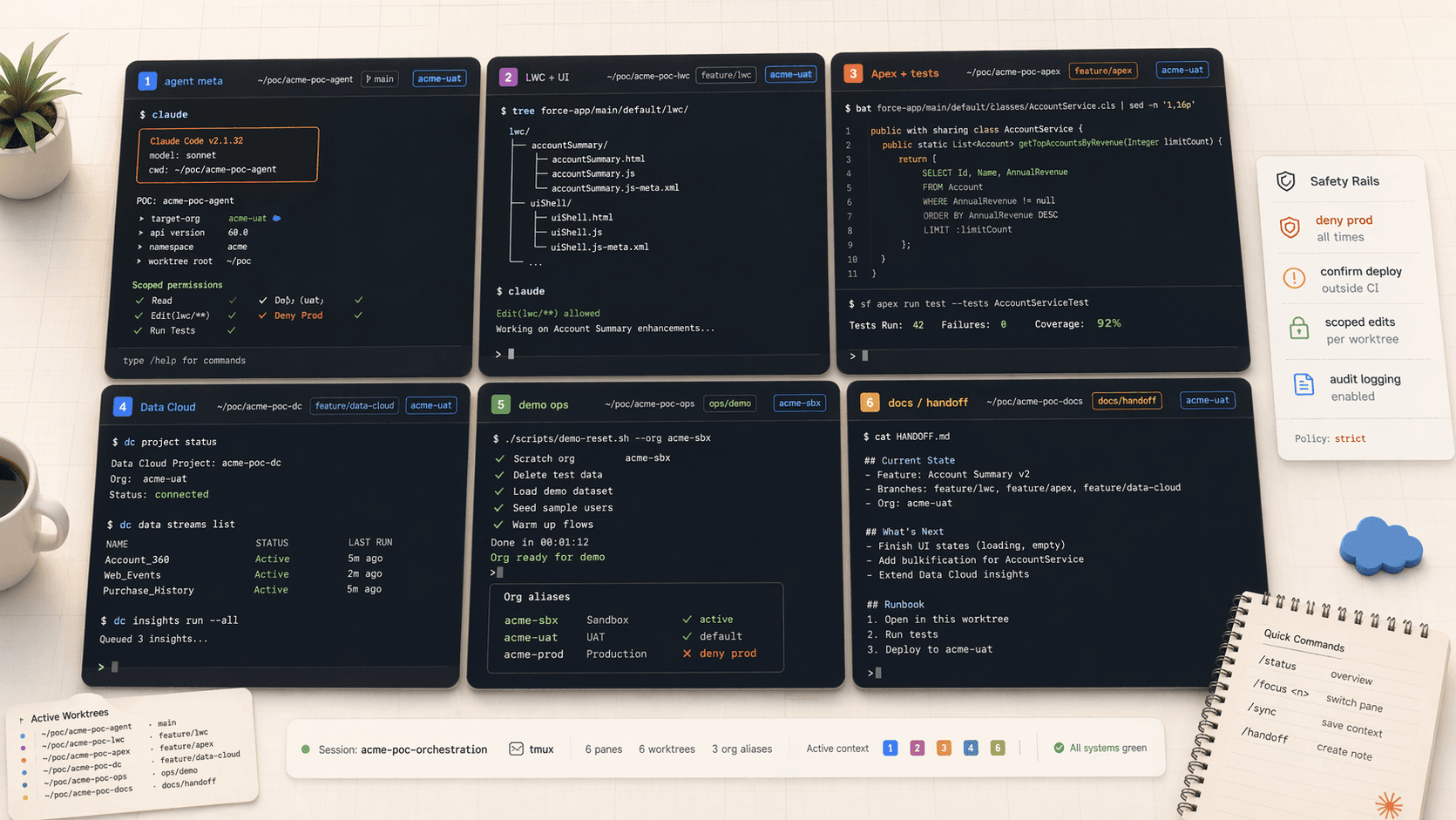
Run six Claude Code sessions in parallel across Warp panes or tmux windows, each driving a different slice of a customer POC. One keyboard, six concurrent agents.
Cursor is one window, one agent (plus backgrounds). Claude Code is "whatever you can open a terminal on". A mid-POC SE with Warp or tmux can easily have six concurrent Claude Code sessions driving six different concerns against two or three customer orgs at once. This page is the playbook.
Why this is Claude-Code-only
Cursor is great at what it does, but it runs inside the IDE window. Claude Code lives in any terminal, which means anything that multiplies terminals (Warp panes, tmux windows, iTerm splits, VS Code terminals) multiplies your agent count for free.
The six-pane Agentforce POC layout
A pattern that works well for a two-week Agentforce POC against a customer UAT:
+--------------------------+--------------------------+
| 1. AGENT METADATA        | 2. LWC + UI              |
|    acme-uat              |    acme-scratch-lwc      |
|    .agent files,         |    Lightning pages,      |
|    topics, prompts       |    community tweaks      |
+--------------------------+--------------------------+
| 3. APEX + TESTS          | 4. DATA 360              |
|    acme-scratch-apex     |    acme-dc               |
|    services, triggers,   |    DLOs, DMOs,           |
|    integration logic     |    segments, activations |
+--------------------------+--------------------------+
| 5. DEMO ORCHESTRATION    | 6. DOCS + HANDOFF        |
|    (no org attached)     |    (no org attached)     |
|    seed data, reset,     |    architecture doc,     |
|    Warp launch config    |    handoff deck          |
+--------------------------+--------------------------+
Each pane runs its own claude session in its own working directory. Crucially, most of these can run in parallel git worktrees so the agents don't step on each other's branches.
Prerequisites
A terminal that handles panes well
Warp has first-class split panes (Cmd+D horizontal, Cmd+Shift+D vertical). Drive Claude Code Panes, save the layout as a Workflow, and reopen the entire POC setup next morning with one command.
Warp also has AI-native features that play nicely with Claude Code running inside a pane, because claude is just a process.
The classic. Session = POC. Windows = concerns. Panes = secondary terminals per concern.
tmux new -s acme-poc
# split panes
Ctrl-b "      # horizontal
Ctrl-b %      # vertical
# rename a pane-holding window
Ctrl-b ,
Save your layout with tmux-resurrect so you can tmux kill-server at the end of the day and bring it all back in the morning.
Cmd+D / Cmd+Shift+D for splits. Save layouts as Arrangements. Works fine but you lose Warp's Workflows and tmux's resurrect.
Git worktrees so agents don't collide
Six agents on the same branch is a recipe for merge hell. Use worktrees:
cd ~/code/acme-poc
git worktree add ../acme-poc-agent   feature/agent-metadata
git worktree add ../acme-poc-lwc     feature/lwc
git worktree add ../acme-poc-apex    feature/apex
git worktree add ../acme-poc-dc      feature/data-cloud
git worktree add ../acme-poc-ops     feature/demo-ops
git worktree add ../acme-poc-docs    feature/handoff
Each pane cds into its own worktree, starts its own claude session, and commits on its own branch. You merge to main once a day.
Per-worktree org aliases
Each worktree needs its target org pinned so you can't accidentally deploy LWC work into the Data 360 org.
cd ../acme-poc-agent && sf config set target-org=acme-uat
cd ../acme-poc-lwc   && sf config set target-org=acme-scratch-lwc
cd ../acme-poc-apex  && sf config set target-org=acme-scratch-apex
cd ../acme-poc-dc    && sf config set target-org=acme-dc
sf config set writes to .sf/config.json inside that folder. Each pane now has its own scoped org.
Per-worktree .claude/settings.local.json
This is the detail that makes parallel agents safe. Each worktree gets its own local settings that narrow what Claude can touch:
// acme-poc-lwc/.claude/settings.local.json
{
  "permissions": {
    "allow": [
      "Bash(sf project deploy start:*)",
      "Bash(sf project retrieve start:*)",
      "Edit(force-app/main/default/lwc/**)"
    ],
    "deny": [
      "Bash(sf project deploy start --target-org acme-prod*)",
      "Edit(force-app/main/default/classes/**)"
    ]
  }
}
The LWC agent literally cannot edit Apex. The Apex agent cannot touch LWC. Parallel by construction.
Booting the six-pane layout
Warp has first-class Launch Configurations: a YAML file that describes a window layout, which folder each pane opens in, and what command runs there. Save it once, open the whole POC with one click (or one command).
Create ~/.warp/launch_configurations/acme-poc.yaml:
---
name: Acme POC
windows:
  - tabs:
      - layout:
          split_direction: horizontal
          panes:
            - layout:
                split_direction: vertical
                panes:
                  - cwd: ~/code/acme-poc-agent
                    commands:
                      - exec: claude
                  - cwd: ~/code/acme-poc-apex
                    commands:
                      - exec: claude
                  - cwd: ~/code/acme-poc-ops
                    commands:
                      - exec: claude
            - layout:
                split_direction: vertical
                panes:
                  - cwd: ~/code/acme-poc-lwc
                    commands:
                      - exec: claude
                  - cwd: ~/code/acme-poc-dc
                    commands:
                      - exec: claude
                  - cwd: ~/code/acme-poc-docs
                    commands:
                      - exec: claude
This produces the six-pane 3x2 grid exactly: left column is agent / apex / ops, right column is LWC / data cloud / docs. Every pane boots into its own worktree and auto-runs claude.
Open it one of three ways:
# From any terminal
open "warp://launch/Acme%20POC"

# From the Warp command palette (Cmd+P)
> Launch Configuration: Acme POC

# Pin it to the Warp Drive sidebar and click it
Warp Drive: share the config across the team
Put acme-poc.yaml in the repo under .warp/launch_configurations/ and symlink to ~/.warp/launch_configurations/. Every SE who clones the repo gets the same six-pane layout. New hire onboarding collapses to "run this setup script".
If you're a tmux holdout, put this in scripts/boot-poc.sh:
#!/usr/bin/env bash
set -e

ROOT="$HOME/code"
SESSION="acme-poc"

tmux new-session -d -s "$SESSION" -c "$ROOT/acme-poc-agent"
tmux send-keys -t "$SESSION" 'claude' C-m

tmux split-window -h -t "$SESSION" -c "$ROOT/acme-poc-lwc"
tmux send-keys -t "$SESSION" 'claude' C-m

tmux split-window -v -t "$SESSION:0.0" -c "$ROOT/acme-poc-apex"
tmux send-keys -t "$SESSION" 'claude' C-m

tmux split-window -v -t "$SESSION:0.1" -c "$ROOT/acme-poc-dc"
tmux send-keys -t "$SESSION" 'claude' C-m

tmux new-window -t "$SESSION" -c "$ROOT/acme-poc-ops"
tmux send-keys -t "$SESSION" 'claude' C-m

tmux split-window -h -t "$SESSION" -c "$ROOT/acme-poc-docs"
tmux send-keys -t "$SESSION" 'claude' C-m

tmux attach -t "$SESSION"
Pair with tmux-resurrect so you can tmux kill-server at end of day and restore tomorrow.
One command, six panes, six claude sessions, six scoped working directories. This is the moment where Claude Code's price-per-turn design starts to matter: you're running real parallelism, not just faster single-agent work.
What each agent actually does
🧠 1. Agent metadata
Iterates on .agent files, topics, and prompt templates in acme-uat. Runs sf agent test against each push.
🎨 2. LWC + UI
Lightning pages and community pages in a dedicated scratch so UI iteration is free and disposable.
⚙️ 3. Apex + tests
Service classes, triggers, integration logic in a separate scratch so Apex test cycles don't gate the UAT org.
📊 4. Data 360
DLOs, DMOs, segments, activations in the DC org. Queries piped through claude -p for sanity checks.
🎬 5. Demo orchestration
No org attached by default. Maintains seed scripts, reset scripts, and the Warp launch config. Runs against whichever org you ask.
📝 6. Docs + handoff
Architecture doc, handoff deck, screenshots, ERDs. Pulls context from the other worktrees without committing to them.
Communication between panes
The one weakness of the six-pane setup is that the agents don't know about each other. Two tricks help:
Shared AGENTS.md, per-pane briefings
Keep one AGENTS.md at the repo root that describes the POC, the customer, the orgs, and the division of labor across worktrees. Every pane inherits it through git worktree. Then give each worktree its own .claude/briefing.md that says "you are the LWC agent, you do not touch Apex, the Apex agent is working in ../acme-poc-apex".
Single source of truth for the demo script
The demo flow lives in exactly one file (pane 5 owns it). Any pane that changes something the demo depends on updates that file. Otherwise pane 1 adds a new topic, pane 5 doesn't know, the demo breaks.
Cost discipline across six agents
Six concurrent sessions multiply cost by six. A few rules:
- One agent per concern, not one agent per file. More sessions is not always better.
- Don't keep all six hot during deep solo work. If you're pair-programming with the Apex agent for an hour, let the other five idle.
- Use
claude -pfor the read-only panes. Pane 6 (docs) often only needs one-shot turns, not an interactive session.claude -pis cheaper and simpler. - Set spend tracking.
claude --output-format jsonreturnstotal_cost_usdper turn. Log it per worktree and check at day-end.
When NOT to parallelize
Six agents is not always the answer. Cases where a single session is better:
- Debugging a flaky integration test where you need continuous context. Splitting it adds coordination cost.
- Any task where the back-and-forth is the point (prompt tuning an agent, iterating on a copy deck).
- Early discovery on a new customer before you even know what the concerns are.
Parallelize when the work is parallel. One agent when the work is one thread.
Next
- Headless Automation shows how pane 5 (ops) uses
claude -pto drive demo reset scripts across multiple orgs. - Checkpoints & Time Travel covers how each of the six panes can rewind independently.
- Subagents shows how to further fan out inside a single pane.
Hooks and Custom Commands
The deterministic layer of Claude Code for Salesforce work. Guardrails that keep customer data safe, validators that keep broken code out of the repo, and shortcuts for work you do every day.
CLI Composition
Pipe sf CLI output into Claude, pipe Claude's answers into other commands, and compose Salesforce tooling the way Unix composes. The one feature Cursor cannot match.