
Headless Automation
Wrap Claude Code into shell scripts, cron jobs, and repeatable demo harnesses. Turn POC overhead into one-liners.
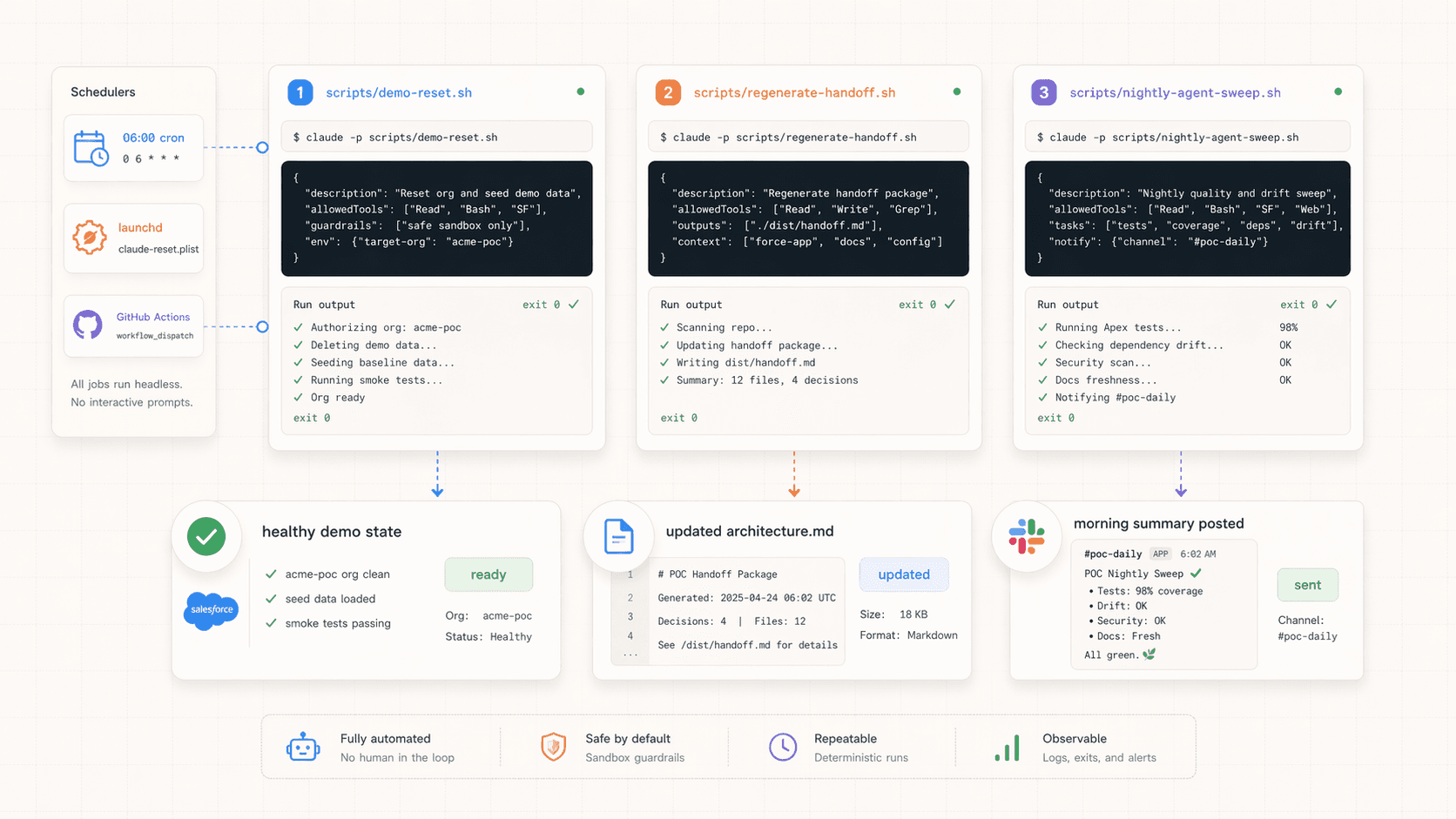
Every Agentforce or Data 360 POC accumulates tedious chores: re-seed the demo, reset the agent conversation state, refresh the sample records, regenerate the handoff doc. These chores kill SE hours. Claude Code headless (claude -p) exists exactly for this shape of work. This page is the patterns that compound.
What headless mode actually is
claude -p "your prompt here"One turn. No interactive session. Reads stdin if you pipe to it. Prints to stdout. Exits. That's it.
Combined with your shell, sf, and cron/launchd/GitHub Actions, this is how you turn 45-minute weekly chores into 30-second scripts.
The big three SE automation targets
Demo reset
The thing every SE has hand-run 50 times and finally gets tired of.
#!/usr/bin/env bash
# scripts/demo-reset.sh
set -euo pipefail

ORG="${1:-acme-uat}"
echo "Resetting demo state in $ORG..."

# 1. Delete mutated demo records
sf data query --target-org "$ORG" \
  --query "SELECT Id FROM Case WHERE Origin = 'Demo' AND IsClosed = false" \
  --result-format csv > /tmp/to-close.csv

sf data update bulk --target-org "$ORG" --file /tmp/to-close.csv --sobject Case \
  --wait 10 || true

# 2. Re-seed fresh records
sf data import tree --target-org "$ORG" --plan data/demo-plan.json

# 3. Ask Claude to verify and summarize
sf data query --target-org "$ORG" \
  --query "SELECT Count(Id) c, Origin FROM Case GROUP BY Origin" --json \
  | claude -p "Is this a healthy demo state? Expected: 20 Demo, 5 Web. Report any deviation."
Crucially, step 3 is where Claude earns its keep. A human-readable "healthy/unhealthy" verdict at the end of the script beats eyeballing CSV.
Handoff doc regeneration
Update the customer-facing architecture doc every time metadata changes, without opening an editor:
#!/usr/bin/env bash
# scripts/regenerate-handoff.sh
set -euo pipefail

sf project retrieve preview --target-org acme-uat --json > /tmp/delta.json

claude -p "$(cat <<'EOF'
Read /tmp/delta.json and update docs/architecture.md. For each changed file:
- Add a bullet under the right section
- Preserve existing structure
- Write in plain customer-facing English, no jargon
Output the updated architecture.md.
EOF
)" --dangerously-skip-permissions \
  --allowedTools "Read,Edit,Write" \
  > docs/architecture.md

git add docs/architecture.md
git commit -m "docs: regen architecture from delta $(date +%F)" || true
The --allowedTools flag is the scalpel that makes --dangerously-skip-permissions safer in a script: Claude can read and write the doc but nothing else.
Overnight agent test sweep
A cron at 6 a.m. every weekday that runs the full Agentforce test suite, triages failures, and posts a summary to your Slack:
#!/usr/bin/env bash
# scripts/nightly-agent-sweep.sh
set -euo pipefail

sf agent test run --api-name CustomerServiceAgentTests \
  --target-org acme-uat --result-format json --wait 30 > /tmp/sweep.json

SUMMARY=$(cat /tmp/sweep.json | claude -p \
  "Triage this Agentforce test run. Output 5 bullets max. Flag regressions vs yesterday.")

curl -X POST "$SLACK_WEBHOOK" -H 'Content-Type: application/json' \
  -d "{\"text\": \"Nightly sweep for acme-uat:\n$SUMMARY\"}"
Schedule with cron or launchd. Sleep well.
The flags that matter in scripts
claude -p "..." \
  --output-format json \
  --model sonnet \
  --allowedTools "Read,Edit,Bash(sf data query:*)" \
--dangerously-skip-permissionstext (default), json, stream-json. Use json in scripts so you can extract total_cost_usd, session_id, and the result separately:
RESULT=$(claude -p "..." --output-format json)
COST=$(echo "$RESULT" | jq -r .total_cost_usd)
ANSWER=$(echo "$RESULT" | jq -r .result)
echo "Turn cost: \$$COST"
sonnet for most automation (cheaper, plenty smart). opus when the task is genuinely hard (deploy triage across a huge org, complex agent regression analysis). Pick it explicitly in scripts so a future default change doesn't break your cost projections.
Whitelist. If the script only needs to read files, pass --allowedTools "Read". This makes --dangerously-skip-permissions dramatically safer because even with permissions off, only whitelisted tools are available.
Common shapes:
- Pure triage:
Read - Doc regeneration:
Read,Edit,Write - Safe query automation:
Read,Bash(sf data query:*)
Turns off the per-tool approval prompt. Necessary in cron and CI. Only safe when paired with --allowedTools and with the script running in an environment that can't reach production. A cron job that has sf auth to a customer prod org is not that environment.
Secrets: API key vs subscription auth
Scripts need non-interactive auth. Two options:
- Anthropic API key. Set
ANTHROPIC_API_KEYin the environment. Claude Code will use it. Best for CI, cron, anything on a server. Billed via Anthropic Console. - Your subscription OAuth token. If you log in once interactively, Claude Code caches the token and automation on the same machine can use it. Fine for your own laptop. Not fine for shared servers.
Never commit the API key
Put it in ~/.zshrc (export ANTHROPIC_API_KEY=sk-ant-...) or in your OS keychain. For CI, use GitHub Actions secrets. Never check the key into the repo, even on a POC branch you think no one will see.
Error handling patterns
Three rules that prevent silent script failures:
set -euo pipefail          # die on error, undefined var, or pipe failure
trap 'echo "Failed at line $LINENO"' ERR

# Check Claude's exit code explicitly
if ! RESULT=$(claude -p "..." --output-format json); then
  echo "Claude turn failed" >&2
  exit 1
fi

# Check the JSON is actually JSON
if ! echo "$RESULT" | jq -e . >/dev/null 2>&1; then
  echo "Claude returned non-JSON: $RESULT" >&2
  exit 2
fi
In a nightly cron this is the difference between "we caught it at 6:05 a.m." and "we noticed at 4 p.m. when someone asked".
Scheduling options
# crontab -e
0 6 * * 1-5 /Users/you/code/acme-poc/scripts/nightly-agent-sweep.sh >> /tmp/sweep.log 2>&1
Simple, universal, survives reboots if the daemon is configured to run on boot.
The right answer on macOS. ~/Library/LaunchAgents/com.acme.nightly-sweep.plist:
<?xml version="1.0" encoding="UTF-8"?>
<plist version="1.0">
<dict>
  <key>Label</key><string>com.acme.nightly-sweep</string>
  <key>ProgramArguments</key>
  <array>
    <string>/Users/you/code/acme-poc/scripts/nightly-agent-sweep.sh</string>
  </array>
  <key>StartCalendarInterval</key>
  <dict><key>Hour</key><integer>6</integer><key>Minute</key><integer>0</integer></dict>
</dict>
</plist>
Load with launchctl load ~/Library/LaunchAgents/com.acme.nightly-sweep.plist.
Covered in detail on the CI Reviews & Handoff page. Short version: same scripts, just run by Actions on a schedule.
Wrapping commonly-needed pipelines as slash commands
For pipelines you use inside interactive sessions, wrap them as slash commands so the interactive agent can run them for you. In .claude/commands/triage-deploy.md:
---
description: Dry-run deploy to the active org and triage errors.
---

Run this bash command and summarize the output:

```bash
sf project deploy start --dry-run --json
```

Group errors by root cause. List the files affected per group. Suggest the fix order.
Now in any interactive session, /triage-deploy does the whole pipeline. Covered more in Hooks & Commands.
Anti-patterns
Do not loop claude -p over rows
# BAD
cat records.csv | while read row; do
  echo "$row" | claude -p "analyze this"
done
One turn per row is one bill per row. Pass the whole file in one prompt and ask for a per-row summary.
Always tee the input
Every headless pipeline should save its input somewhere:
sf apex run test --json | tee /tmp/last-run.json | claude -p "..."When the answer looks wrong, you want to read what Claude actually saw.
Next
- CI Reviews & Handoff extends these scripts to run in GitHub Actions.
- CLI Composition is the deep dive on the pipe primitive.
- Checkpoints & Time Travel for interactive rewinding during live demos.
CLI Composition
Pipe sf CLI output into Claude, pipe Claude's answers into other commands, and compose Salesforce tooling the way Unix composes. The one feature Cursor cannot match.
Checkpoints & Time Travel
Resume sessions by ID, rewind to any prior turn, branch a POC session into parallel experiments, and recover from demo-day disasters without losing context.