
Using Jag's SF Skills
Install and use the most comprehensive Salesforce skill library with 33 skills covering every corner of the platform
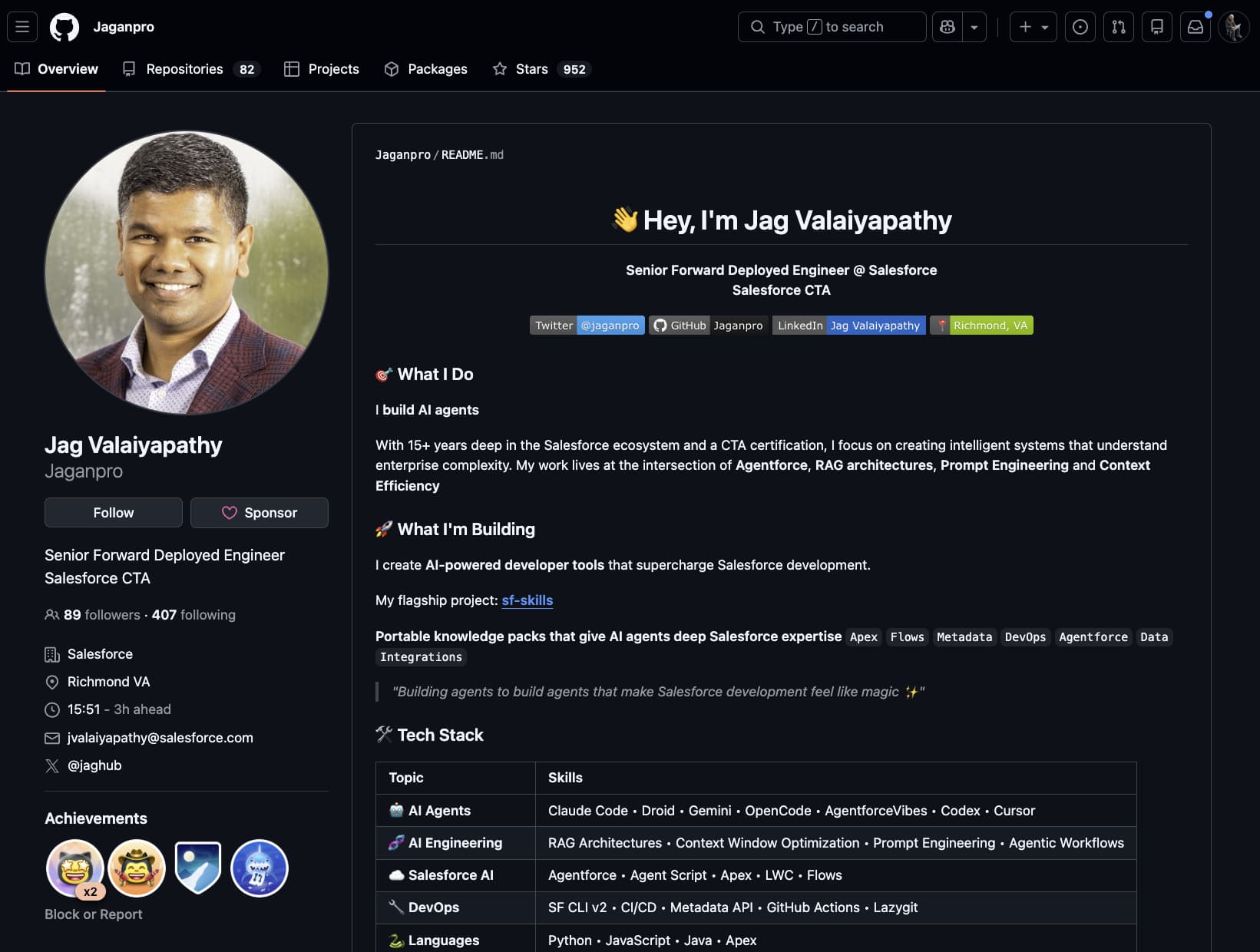
Jag Valaiyapathy, a Salesforce Certified Technical Architect (CTA), has built and open-sourced the most comprehensive Salesforce skill library available. It covers 33 skills across Apex, Flow, LWC, SOQL, metadata, Data 360, Agentforce, and OmniStudio, each with built-in validation rubrics and scoring.
Why This Library?
This isn't a handful of generic prompts. Each skill contains deep, opinionated guidance with point-based scoring rubrics, the same kind of knowledge a senior architect would bring to a code review. The library is actively maintained, community-driven, and follows the open Agent Skills standard.
What's Included
The library organizes skills by capability area:

Development
sf-apex · sf-flow · sf-lwc · sf-soql: Core development skills with scoring rubrics for Apex (90-pt), Flow (110-pt), LWC (165-pt), and SOQL (100-pt)

Quality
sf-testing · sf-debug: Test execution, coverage analysis, bulk testing patterns, debug log analysis, and governor limit troubleshooting

Foundation
sf-metadata · sf-data · sf-docs · sf-permissions: Metadata generation, data operations, official docs retrieval, and permission set analysis

Integration
sf-connected-apps · sf-integration: OAuth flows, External Client Apps, Named Credentials, REST/SOAP callouts, Platform Events, and Change Data Capture

AI & Automation
sf-ai-agentscript · sf-ai-agentforce · sf-ai-agentforce-testing · sf-ai-agentforce-observability · sf-ai-agentforce-persona: Agent design, Agent Script DSL, testing, trace analysis, and persona design

Data 360
sf-datacloud + 6 phase-specific skills. End-to-end Data 360 pipeline: connect, prepare, harmonize, segment, act, and retrieve

Industries
sf-industry-commoncore-omnistudio-analyze + 5 OmniStudio skills. Data Mappers, Integration Procedures, OmniScripts, FlexCards, and callable Apex

DevOps
sf-deploy · sf-diagram-mermaid · sf-diagram-nanobananapro: Deployment automation, Mermaid diagrams, and visual artifacts
Installation
The fastest way to get all 33 skills into Cursor:
npx skills add Jaganpro/sf-skillsThis downloads every skill and places them in the correct directory. Restart Cursor after installation.
What This Installs
The npx path installs the skill files (SKILL.md) only. This gives Cursor the knowledge and scoring rubrics for all 33 skills. For the full Claude Code experience with hooks, agents, and LSP integration, see the Full Install tab.
If you also use Claude Code, the full installer adds skills plus a pre-built team of 7 specialist subagents, a shared hook system, LSP integration, and automatic validation:
curl -sSL https://raw.githubusercontent.com/Jaganpro/sf-skills/main/tools/install.sh | bashThis installs:
- 36 Salesforce skills to
~/.claude/skills/ - 7 specialist Claude Code agents to
~/.claude/agents/(the FDE pod, see below) - Shared hook system for auto-validation on Write/Edit
- LSP wrappers for Apex, LWC, and Agent Script
Restart Claude Code after installation.
Only need one skill? Install just the one you want:
npx skills add Jaganpro/sf-skills --skill sf-apexYou can install multiple specific skills:
npx skills add Jaganpro/sf-skills --skill sf-apex
npx skills add Jaganpro/sf-skills --skill sf-lwc
npx skills add Jaganpro/sf-skills --skill sf-flow
The FDE pod (Claude Code subagents)
The full installer ships a pre-configured team of 7 Claude Code subagents under ~/.claude/agents/. It's modeled after a real Forward Deployed Engineering pod: one strategist who plans and delegates, two FDE specialists who build Agentforce-specific work, two cross-cutting specialists who handle QA and release for everyone, and two PS (Platform Services) architects who own the platform infrastructure underneath.
fde-strategist                     Plans, delegates up to 4 concurrent workers, no edits
├── FDE team (agent-specific)
│   ├── fde-engineer               Bot metadata, topics, actions, Apex, Agent Scripts
│   └── fde-experience-specialist  Persona, conversation design, utterances, LWC
├── Cross-cutting (both teams)
│   ├── fde-qa-engineer            Apex + agent testing, debug logs, session tracing
│   └── fde-release-engineer       Deploys, Connected Apps, Agent Script CLI, CI/CD
└── PS team (platform infrastructure)
    ├── ps-technical-architect     Service Apex, integrations, data, LWC, performance
    └── ps-solution-architect      Metadata, Flows, permissions, Mermaid diagrams
Each subagent is a single .md file with YAML frontmatter declaring its model, permissionMode, tools, disallowedTools, and bound skills. The strategist runs in plan mode with Edit and Write disabled. The six implementers run in acceptEdits with a constrained toolset.
Who does what
fde-strategist
Skills: sf-ai-agentforce, sf-diagram-mermaid
Tools: Read-only + Task to spawn the other six
Mode: plan (cannot write files)
The only agent you address directly. Takes a goal, researches the repo, decomposes it into tasks, and delegates up to 4 concurrent workers.
fde-engineer
Skills: sf-ai-agentforce, sf-ai-agentscript
Hands-on Agentforce implementer. Writes BotDefinition, GenAiPlanner, GenAiPlugin, GenAiFunction metadata, Agent Scripts, and Apex for invocable actions.
fde-experience-specialist
Skills: sf-ai-agentforce-persona, sf-ai-agentforce, sf-lwc, sf-diagram-nanobananapro
Owns the conversational experience. Authors persona docs, utterance libraries, greetings, fallbacks, and the companion LWCs that host the conversation.
fde-qa-engineer
Skills: sf-testing, sf-debug, sf-ai-agentforce-testing, sf-ai-agentforce-observability
Runs Apex tests, multi-turn agent conversation tests, and topic classification validation. Pulls session traces with the observability skill to explain why an agent misfired.
fde-release-engineer
Skills: sf-deploy, sf-connected-apps, sf-ai-agentscript
Dry-runs deploys first, configures Connected Apps for OAuth flows, handles Agent Script CLI deploys, and manages the release pipeline.
ps-technical-architect
Skills: sf-apex, sf-integration, sf-connected-apps, sf-data, sf-soql, sf-debug, sf-deploy, sf-lwc
Backend and integration workhorse. Service Apex, REST/SOAP endpoints, Named Credentials, Platform Events, CDC, data model, and the LWCs the platform depends on.
ps-solution-architect
Skills: sf-metadata, sf-flow, sf-permissions, sf-testing, sf-diagram-mermaid
Declarative implementer. Custom objects and fields, Flows with fault paths, permission set groups, and the Mermaid architecture diagrams that go in handoff docs.
Using the pod
You don't invoke the specialists directly. You ask the strategist, and it plans and delegates:
Use the fde-strategist agent. Goal: build a Customer Service Triage
Agentforce agent for ACME in the acme-uat org. Topics for warranty,
billing, and shipping. Include a companion LWC, a Connected App for the
mobile channel, and an agent test suite covering all three topics plus
an ambiguous utterance. Target org alias: acme-uat.
The strategist returns a plan and then dispatches: ps-solution-architect drafts metadata and the Mermaid diagram, fde-engineer scaffolds the bot, fde-experience-specialist writes the persona and LWC in parallel, ps-technical-architect builds service Apex, fde-qa-engineer creates tests, fde-release-engineer runs a dry-run deploy. Up to four of those run concurrently.
Read the agent files even if you don't use the pod
The seven .md files under ~/.claude/agents/ are a masterclass in writing production-grade subagent briefs: scope, permission mode, tool allow-list, skill binding, memory scope, and max turn budget. If you're writing your own subagents (in Claude Code or as hand-rolled briefs in Cursor), copy the shape.
The full playbook on when to use subagents and how to write your own briefs lives in Subagents & Parallelism. That page also covers how to reproduce the pod's behavior in Cursor with hand-written briefs that reference the same skills.
Prerequisites
The skills themselves only require Node.js 18+ to install. However, certain features need additional tools:
| Requirement | Needed For | Install |
|---|---|---|
| Node.js 18+ | Installation, LWC LSP | brew install node |
| Salesforce CLI v2 | Org operations, deployments | npm install -g @salesforce/cli |
| Java 11+ | Code Analyzer PMD, Apex LSP | brew install openjdk@11 |
| Python 3.10+ | Hooks, validation scripts | brew install python@3 |
| Authenticated Org | Live query plans, deployments | sf org login web |
Graceful Degradation
Don't have Java or Python installed? The skills still work. They'll just skip the Code Analyzer and hook-based validation features. The core AI guidance and scoring rubrics work with Node.js alone.
How the Skills Work in Practice
Once installed, the skills activate automatically based on what you're working on. Here's what changes in your daily workflow:
Apex Development
Without skills, you ask Cursor to write a trigger and get something functional but generic.
With sf-apex loaded, Cursor generates code that follows:
- Trigger Actions Framework patterns with proper handler separation
- Bulkification with collection-based processing
- Custom exception classes and structured error handling
- Test classes with bulk scenarios (200+ records) and meaningful assertions
The skill scores output on a 90-point rubric across 5 categories: Testing (25), Architecture (20), Clean Code (20), Error Handling (15), and Performance (10).
LWC Development
With sf-lwc loaded, Cursor generates components that follow:
- SLDS 2 class usage and styling hooks
- Accessibility patterns (ARIA labels, keyboard navigation, focus management)
- Dark mode compatibility
- Wire service best practices
- Jest test scaffolding
The skill scores on a 165-point rubric across 9 categories, covering everything from component structure to GraphQL patterns.
Flow Development
With sf-flow loaded, Cursor builds Flows with:
- Proper fault paths on every DML and callout element
- Naming conventions for variables and decision elements
- Bulkification considerations
- Entry condition best practices
Scored on a 110-point rubric covering Design/Naming, Logic/Structure, Error Handling, Architecture, Security, and Performance.
Usage Examples
Here are real prompts you can use once the skills are installed. The AI will automatically apply the relevant skill's guidance.
Quick Skill Access
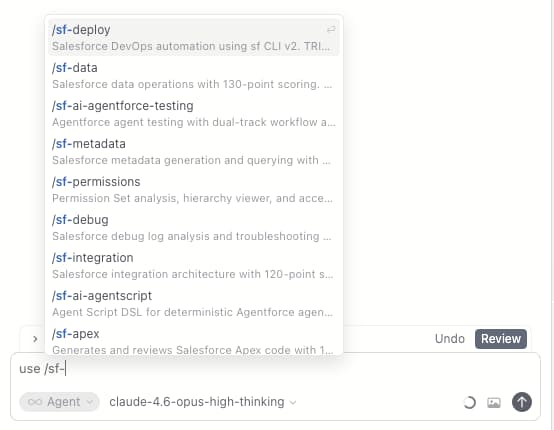
Type /sf- in Cursor's chat to see all available Salesforce skills and quickly invoke any one by name, like /sf-apex, /sf-flow, or /sf-lwc.
Apex
/sf-apex Generate an Apex trigger for Account using Trigger Actions Framework/sf-apex Review my AccountService class for best practices/sf-apex Create a batch job to process millions of records with proper error handling LWC
LWC
/sf-lwc Create a datatable component to display Accounts with sorting and pagination/sf-lwc Build a form component for creating Contacts with field validation/sf-lwc Generate a Jest test for my accountCard component Flow
Flow
/sf-flow Create a record-triggered flow for opportunity stage changes with error handling/sf-flow Build a screen flow for account creation with validation SOQL
SOQL
/sf-soql Optimize this query: SELECT Id, Name FROM Account WHERE Name LIKE '%Corp%'/sf-soql Generate a SOQL query to find duplicate Leads by EmailAgentforce
/sf-ai-agentforce Create an Agentforce agent for customer support triage/sf-ai-agentforce Generate a PromptTemplate for case summariesIntegration
/sf-connected-apps Create a Named Credential for Stripe API with OAuth client credentials/sf-integration Generate a REST callout service with retry and error handlingUpdating
npx skills check
npx skills update
python3 ~/.claude/sf-skills-install.py --status
python3 ~/.claude/sf-skills-install.py --updateFor a complete reinstall:
python3 ~/.claude/sf-skills-install.py --force-updateVideo Tutorials
Jag has published video walkthroughs of the skills in action:
| Video | Description |
|---|---|
| How to Add/Install Skills | Install the sf-skills library and configure your agent |
| Skills Demo & Walkthrough | Live demo of Apex, Flow, Metadata, and Agentforce skills |
Full Skill Reference
Here's the complete list of every skill in the library with its current status:
Development & Quality
| Skill | Description | Scoring |
|---|---|---|
| sf-apex | Apex classes, triggers, batch jobs, test classes | 90-point rubric |
| sf-flow | Record-triggered, screen, autolaunched, and scheduled Flows | 110-point rubric |
| sf-lwc | Lightning Web Components, Jest, SLDS, LMS | 165-point rubric |
| sf-soql | Query generation, optimization, relationship queries | 100-point rubric |
| sf-testing | Test execution, coverage analysis, bulk testing | N/A |
| sf-debug | Debug log analysis, governor limits, stack traces | N/A |
Foundation & Integration
| Skill | Description |
|---|---|
| sf-metadata | Custom objects, fields, validation rules, permission sets |
| sf-data | Test data creation, bulk import/export, data factory patterns |
| sf-docs | Official Salesforce documentation retrieval guidance |
| sf-permissions | Permission set analysis, hierarchy viewer, access auditing |
| sf-connected-apps | OAuth flows, JWT Bearer, Connected Apps, External Client Apps |
| sf-integration | Named Credentials, External Services, REST/SOAP, Platform Events, CDC |
AI & Automation
| Skill | Description |
|---|---|
| sf-ai-agentforce | Agent Builder, PromptTemplate, Models API, GenAi metadata |
| sf-ai-agentscript | Agent Script DSL, FSM patterns, slot filling |
| sf-ai-agentforce-testing | Agent test specs, topic routing validation |
| sf-ai-agentforce-observability | STDM trace capture and execution analysis |
| sf-ai-agentforce-persona | Persona design, identity framework, voice/tone |
Data 360
| Skill | Description |
|---|---|
| sf-datacloud | Cross-phase orchestration, data spaces, data kits |
| sf-datacloud-connect | Connections, connectors, source discovery |
| sf-datacloud-prepare | Data streams, DLOs, transforms, DocAI ingestion |
| sf-datacloud-harmonize | DMOs, mappings, identity resolution, unified profiles |
| sf-datacloud-segment | Segments, calculated insights, audiences |
| sf-datacloud-act | Activations, activation targets, data actions |
| sf-datacloud-retrieve | SQL, async query, vector search, search indexes |
Industries (OmniStudio)
| Skill | Description |
|---|---|
| sf-industry-commoncore-omnistudio-analyze | Namespace detection, dependency mapping, impact analysis |
| sf-industry-commoncore-datamapper | Data Mapper (DataRaptor) creation and validation |
| sf-industry-commoncore-integration-procedure | Integration Procedure orchestration |
| sf-industry-commoncore-callable-apex | System.Callable generation and Open Interface migration |
| sf-industry-commoncore-omniscript | OmniScript guided experiences |
| sf-industry-commoncore-flexcard | FlexCard UI components |
DevOps & Diagrams
| Skill | Description |
|---|---|
| sf-deploy | Deployment automation, scratch orgs, CI/CD pipelines |
| sf-diagram-mermaid | Mermaid diagrams for ERDs, OAuth flows, architecture |
| sf-diagram-nanobananapro | Visual ERDs, LWC mockups, AI-generated images |
Contributing & Support
The library is fully open source under the MIT License. If you find an issue or want to contribute:
- GitHub: github.com/Jaganpro/sf-skills
- Issues: github.com/Jaganpro/sf-skills/issues
- Contributing guide: CONTRIBUTING.md
Get Started
Run npx skills add Jaganpro/sf-skills in your terminal, restart Cursor, and start coding. The skills activate automatically. Just work the way you normally do and watch the quality of your AI-generated Salesforce code improve dramatically.