
Debugging Apex in Cursor
Anonymous Apex, debug logs, the Replay Debugger, and letting the agent read a stack trace
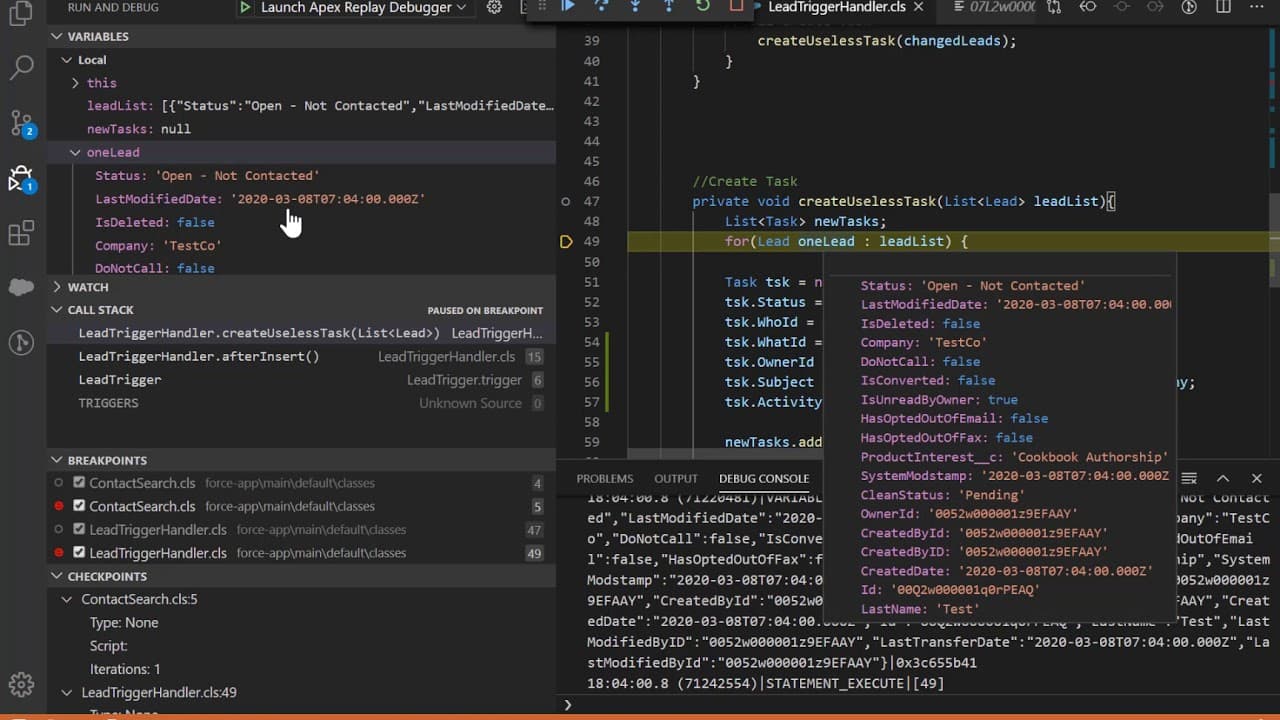
When Apex goes sideways, you want three things: a way to run a quick snippet, a way to read the log it produced, and a way to step through the code that threw. Cursor plus the Salesforce Extension Pack gives you all three, and the agent is usually better at reading a debug log than you are.
Before you start
Install the sf-debug skill. With that skill loaded, pasting a raw .log file into chat and saying "tell me what went wrong" produces a grounded answer, not a guess.
The three tools you'll use
- Anonymous Apex runs a snippet against the org without deploying anything. Perfect for reproducing a bug or poking at data.
- Debug logs are what the org captured while your code ran. The Salesforce Extension Pack's Apex Log Analyzer view turns them into something readable.
- Apex Replay Debugger takes a debug log and lets you step through it as if you were live-debugging, including variable state at each line.
Running anonymous Apex
With the Salesforce MCP installed, ask the agent directly:
Run this anonymous Apex against my default org and show the debug log:

List<Account> accts = [SELECT Id, Name FROM Account LIMIT 5];
for (Account a : accts) System.debug(a.Name);
The agent executes the snippet through the MCP, captures the log, and can interpret it for you in the same response.
- Open a
.apexfile (or create a scratch one, for examplescripts/apex/probe.apex). - Paste your snippet.
- Press
Cmd+Shift+Pon macOS orCtrl+Shift+Pon Windows. - Run SFDX: Execute Anonymous Apex with Editor Contents (or highlight a block and run Execute Anonymous Apex with Currently Selected Text).
Output lands in the Output panel's Apex channel.
sf apex run --file scripts/apex/probe.apex --target-org demoOr inline without a file:
echo 'System.debug([SELECT Name FROM Account LIMIT 1]);' | sf apex run --target-org demoAnonymous Apex runs as you
Whatever permissions and sharing rules apply to your user apply to the snippet. On a customer sandbox, assume any DML you write will commit unless the script throws. Wrap destructive probes in Savepoint + Database.rollback when you're just trying things.
A safe pattern for exploratory Apex:
Savepoint sp = Database.setSavepoint();
try {
    // your experiment here
    insert new Account(Name = 'Test Co');
    System.debug([SELECT Id, Name FROM Account WHERE Name = 'Test Co']);
} finally {
    Database.rollback(sp);
}
Pulling and reading debug logs
Turn on logging for your user
Before a log can exist, your user needs an active trace flag.
sf apex tail log --target-org demoThat streams logs in real time. When the terminal says Listening for Apex..., any debug output from your user shows up live.
For a persistent trace flag (useful if an integration user is hitting errors asynchronously):
sf apex log list --target-org demoGrab a specific log
After something runs, list the recent logs and download the one you want:
sf apex log list --target-org demo
sf apex log get --log-id 07L... --target-org demo --output-dir logs
The log lands in logs/<id>.log. Open it in Cursor.
Let the agent read it
In chat:
@logs/07L5g00000AbCdEfG.log

Summarize this log. Highlight the root cause, which line threw, and the
sequence of DML leading up to it. Then propose a fix.
With sf-debug active, the agent knows Apex log markers like USER_DEBUG, DML_BEGIN, LIMIT_USAGE_FOR_NS, and governor-limit exceptions, and will walk the log in order rather than keyword-matching.
Apex Log Analyzer
The Salesforce Extension Pack (Expanded) ships with Apex Log Analyzer, a visual timeline of a debug log. Open any .log file, then click the lightning icon in the editor title bar to render the timeline. It's the fastest way to eyeball where time was spent and which DML chunk blew a limit.
The Apex Replay Debugger
When System.debug isn't enough and you want to step through the code as it ran:
Set breakpoints
Open the Apex class you want to inspect and click in the gutter next to the line numbers to drop red breakpoints.
Run the code that produces the log
Trigger the bug from the UI, from sf apex run, or from a test. The org records a debug log for the session.
Download the log
sf apex log get --log-id 07L... --output-dir logsLaunch the Replay Debugger
Right-click the downloaded .log file and pick SFDX: Launch Apex Replay Debugger with Current File. Cursor drops you into a full debugger UI: variables, call stack, step in, step over, step out.
The Replay Debugger doesn't run live code. It replays what the org already ran. That makes it safe on customer orgs and turns any historical failure into a debuggable event, as long as someone can get you the log.
When the log isn't enough
Some failures don't leave useful traces. A few escape hatches:
- Add
System.debugstatements, then re-run. The dumbest option is often the fastest. Ask the agent to instrument the failing method with targeted debug statements and redeploy. - Query the objects directly. If an Apex job updates records, check the records'
LastModifiedDateandLastModifiedById. Mismatches tell you whether the job even ran. - Use
Limitsexplicitly. AddingSystem.debug(LoggingLevel.ERROR, 'SOQL used: ' + Limits.getQueries());right before the failure line isolates governor issues. - Check the async job. For queueables, batch, and scheduled jobs, look at
AsyncApexJobandAsyncApexJob.ExtendedStatus:
System.debug([
    SELECT Id, JobType, Status, ExtendedStatus, NumberOfErrors
    FROM AsyncApexJob
    ORDER BY CreatedDate DESC LIMIT 5
]);
Governor limit failures, a short cheat sheet
Patterns the sf-debug skill will catch, but worth knowing by heart:
Too many SOQL queries: 101means a SOQL call happened inside a loop. Look for the loop before the failure.Too many DML statements: 151is the DML version of the same mistake.CPU time limit exceededusually points to nested loops over Maps, or expensive describe calls run repeatedly.Too many rows returnedmeans an unfiltered query pulled more than 50k records. Add aWHEREor aLIMIT.Attempt to de-reference a null objecton a specific line is almost always a missing null check on a relationship field.
For the full review loop, ask the agent:
@AccountService.cls @logs/07L5g00000AbCdEfG.log

Run a `sf-debug` analysis. Return the root cause, the exact line, the
governor limit (if any), and a minimal patch.
A fast reproduction pattern
When you can't reproduce a customer bug locally, a short loop works:
- Ask for (or build) an anonymous Apex snippet that reproduces the scenario. A scratch org is ideal.
- Run it with
sf apex run. - Retrieve the log.
- Let the agent walk the log and propose a patch.
- Apply the patch, rerun the snippet.
- When it passes, promote the snippet into a real
Test.clsso the bug can't come back.
That sixth step is what turns a debug session into a regression test. Combine it with Running & Writing Apex Tests and you've fixed the class of bug, not just the one instance.
What to do next
- Lock the fix in with Running & Writing Apex Tests.
- Scope auto-run so the agent can't make customer data changes while debugging: Security & Data Handling.
- Install the
sf-debugskill for deeper log analysis: Using Skills.