
Agentforce DX
Set up Agentforce DX with Cursor, Salesforce CLI, and the Salesforce Extension Pack
Agentforce DX is the current Salesforce flow for building agents from source control. Use it with Cursor or VS Code, the Salesforce Extension Pack, and the Salesforce CLI.
Not sure which agent flavor to build?
Before you start wiring up DX, read Agent vs. Builder vs. Script. The right primitive (Agentforce Builder, Agent Script, or Prompt Builder) depends on who maintains the agent after handoff and whether behavior needs to be deterministic.
Start here first
Make sure you've already completed the steps on Environment Setup before you follow this guide. That page covers the tooling this flow depends on.
What Salesforce recommends
Salesforce's guide assumes VS Code plus Salesforce CLI as the base setup. Cursor works the same way here because it can use the same extensions and CLI commands.
Cursor Agent can do this for you
You can also have Cursor Agent handle the whole setup without running CLI commands yourself. A good prompt is: Use sf agent or Agentforce DX to build an agent in agent script.
If you’re following Jag’s skills workflow, Dylan’s preferred path is to use /sf-ai-agentscript for the Agent Script part, because that skill already includes the instructional context and patterns needed for this flow.
Install the tools
Install Salesforce Extension Pack
Open Extensions in Cursor, search for Salesforce Extension Pack, and install it.
The pack includes Agentforce DX, the Agent Script Language Server, the Apex Language Server, and Apex Replay Debugger.
If you prefer open-source registries, you can install it from the Open VSX Registry.
Install the Agentforce DX CLI Plugin
The plugin installs the first time you run an agent command. To see the available commands, run:
sf searchThen type agent in the search prompt.
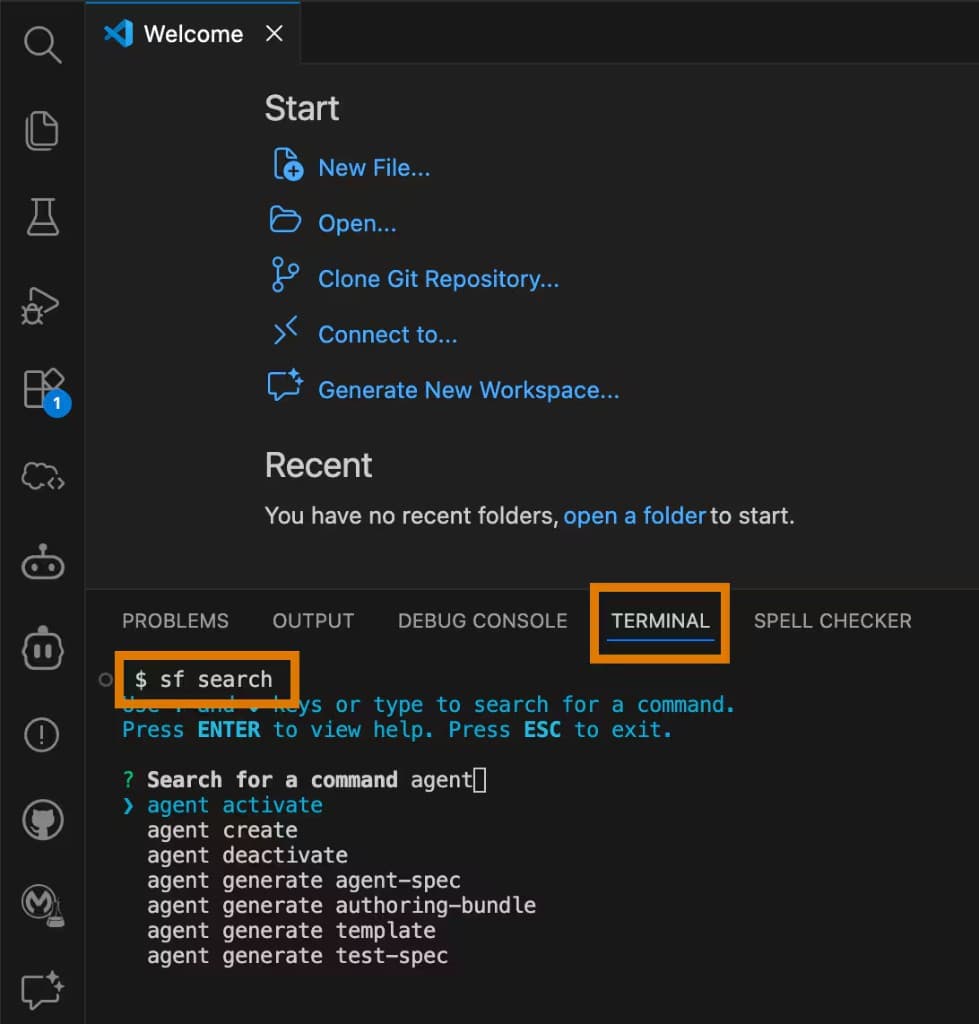
If the plugin is not installed yet, sf agent --help will trigger the JIT install.
Authorize your org
Authorize an org in Cursor or VS Code
Open the Command Palette and run SFDX: Authorize an Org.
Pick the right login target
Choose Project Default, then sign in to your sandbox or Developer Edition org.
Give the org an alias
Use a simple alias such as agentforce, then finish the browser login and allow CLI access.
Pick an org
- Scratch org: use this when you do not need Data Libraries or Data 360.
- Sandbox: use this when your agents need Data Libraries or Data 360.
- Developer Edition: works when Agentforce and Data 360 are enabled.
To create them from the CLI:
sf org create scratchsf org create sandbox
Scratch orgs are empty and quick to spin up. Sandboxes copy production metadata and are the safer choice when your agent needs Data Libraries or Data 360.
Create a project
Create the project from the Agent template
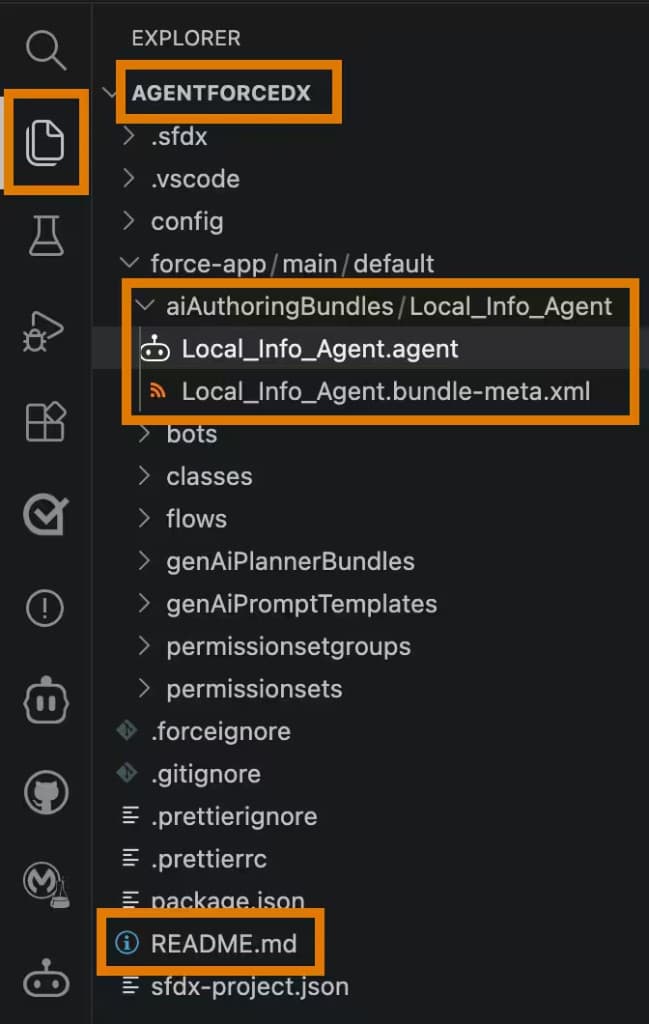
In VS Code or Cursor, run SFDX: Create Project and choose the Agent template if you want the sample Local Info Agent.
Review the generated files
The project includes README.md, config/project-scratch-def.json, and the sample agent bundle under force-app/main/default.
Read the project README
Open the root README.md to understand the generated layout and the sample metadata.
Enable the org
Log in to the org
Sign in to your sandbox or Developer Edition org.
Turn on Data 360 if needed
If your agents need Data Libraries or Data 360, enable Data 360 first and wait for setup to finish before continuing.
Enable Einstein
From Setup, open Einstein Setup and make sure Einstein is enabled.
Enable Agentforce
From Setup, open Agentforce Agents and make sure Agentforce is enabled.
If you just enabled Agentforce, refresh the page to see the New Agent button.
Create an agent user
Use Setup or run:
sf org create agent-user --target-org my-orgThe default user gets the Einstein Agent User profile and these permission sets:
AgentforceServiceAgentBaseAgentforceServiceAgentUserEinsteinGPTPromptTemplateUser
By default, Salesforce creates an Agent User with a unique username, uses that username as the email, and leaves the user without a password. Only admins can view or edit the resulting user in Setup.
If you are not a system administrator, the publish and preview flows need extra permissions:
- Publish an authoring bundle:
Modify All DataandManage AI Agents - Preview an agent:
Agent Platform Builder
You do not need those permissions to generate or validate the Agent Script file.
Common commands
| Command | Purpose |
|---|---|
sf search | Find Agentforce commands |
sf agent --help | Trigger JIT install and show help for the topic |
sf agent preview | Test an agent interactively |
sf agent test run | Run a test suite against an agent |
sf org create agent-user | Create the default agent runtime user |
Source
Salesforce guide: Set Up Your DX Environment
What to do next
- Test the agent you just built in Session Tracing & Agent Testing.
- Pick the right primitive if you haven't yet: Agent vs. Builder vs. Script.
- Deepen authoring with
sf-ai-agentforceorsf-ai-agentscript, depending on which primitive you chose.